


.png)
Amazon put an agent in every seller's account this week. At Accelerate 2026, Seller Assistant stopped waiting to be asked. It now remembers your business and runs workflows while you're logged out, and once you approve, it changes prices and refreshes listings on its own.
That agent is the same one your competitors got. It runs on the same models and reads the same marketplace, and by Amazon's own figure its recommendations are accepted more than 90% of the time. So when it refreshes listings across your category, those listings start to look alike.
Let it run the store, because reorders, price moves and account alerts are the work an agent should take off a founder's desk. The listing is different. It is the clearest place left where you can stand apart, and an agent built for every seller has no reason to make yours different. That is the job Helix™ was built for. Helix is ZonGuru's Listing Engineering platform, and version 2.0 launched today.
What this means for you
The boring work just got free. Reorders, price alerts and account checks now run in the background for every seller, so they no longer set anyone apart.
Your listing is now the main thing that sets your business apart. It is what shoppers read. It is also what both of Amazon's engines read: A9, the keyword engine that decides where you rank, and Alexa for Shopping, the AI that answers shoppers' questions. And it is what every seller's agent is now working on.
Amazon's agent will be editing that listing, and Amazon will be grading its own work. You need a view from outside Amazon to know whether each change helped.
What Amazon announced at Accelerate 2026
Accelerate 2026 ran September 22 to 24 at the Seattle Convention Center, and the Seller Assistant news landed on the 23rd in a post by Mary Beth Westmoreland, Amazon's Vice President of Worldwide Selling Partner Experience. Two parts of it matter for your listings.
1. Workflows: Seller Assistant now works while you're logged out
Seller Assistant now carries "persistent memory of each seller's pricing patterns, inventory cycles, and growth goals," in Amazon's words. On top of that memory sit workflows: standing instructions that keep running when you aren't logged in to Seller Central. You describe the task in plain language and set guardrails, and the workflow goes to work. Amazon gave two example instructions. This is the one to remember:
"Monitor my top category for competitive openings. If you see one, adjust my pricing and refresh the listings."
You choose whether a workflow only recommends or acts, and when it acts you approve first. Amazon says every action is logged with a complete audit trail.
On stage at Accelerate, Amazon showed the assistant going a step further than the post describes. In one example it traced a spike in returns to photos that made the product look too small, generated a replacement image, and offered to post it to the listing.
2. The Selling Partner plugin: your seller account inside Claude and Amazon Quick
The plugin is in beta for US sellers. It connects your "listing contributions, real-time performance metrics, inventory levels, and sales analytics" to Amazon Quick and to Anthropic's Claude. Beyond reading that data, it can act on the account the same way Seller Assistant does inside Seller Central.
The same agent, for every seller in your category
Seller Assistant is built on Amazon Bedrock with Claude models. Amazon says it has reached over 90% of selling partners worldwide, that it has hundreds of thousands of active users, and that those users accept its recommendations more than 90% of the time. For Amazon's product team, that is good news. For a seller trying to stand out, it is a warning.
Picture that workflow running for five brands in one category. The same system spots the same competitive opening, adjusts five prices and refreshes five listings in the same week. Those five refreshes will look alike, because the same model wrote them from the same view of the market, and nine in ten of them get approved without changes. No one has measured this yet. It is what the acceptance rate suggests, not a proven result.
Amazon also showed a new listing builder on stage that cuts the roughly 20 fields a seller fills in to fewer than 10 and completes the rest itself. Each step saves you time, and each one hands a little more of your product's description to a system that writes for everyone.
That is the trade Accelerate offers. The more of the store you hand to the agent, the more your listing becomes the only thing about your business that is still yours to decide. It is also what both of Amazon's engines read. A9, the keyword search engine, still decides where you rank when a shopper types a search. Alexa for Shopping, the AI engine that began rolling out on May 13, answers a shopper's question in words and recommends products based on what your listing says.
Four gaps Amazon's agent leaves on your listing
None of this is a flaw in Seller Assistant. An agent built for the whole marketplace is supposed to work this way. But it leaves four jobs undone on your listing.
This is where Helix comes in. Helix is ZonGuru's Listing Engineering platform. You connect your Seller Central account, and Helix researches your niche on ten years of Amazon keyword, sales and competitor data, writes your title, bullets, description and Item Highlights to answer what buyers actually ask, scores the result, publishes it, and keeps watching the listing afterwards. Version 2.0 launched today. Closing these four gaps is part of what it does, and the section after this one covers the rest.
Gap 1: The agent knows your numbers, not your product
Seller Assistant reads your sales, inventory, ratings and returns, so it can tell you something went wrong. It can't tell what your product is for, who it suits, or which claims your brand is allowed to make, unless your listing already says so.
How Helix closes it. Helix writes your listing from your product and your brand, not from your sales report. You set the rules for your brand and for each product, and a draft that breaks one never goes live. Your listing says what your product is, in your brand's words.
Gap 2: It reads the same market for everyone
The view of your category that Seller Assistant gives you is the view it gives your competitors. That is why its refreshes pull listings toward the same place.
How Helix closes it. Helix researches your niche on ZonGuru's decade of Amazon keyword, sales and competitor data. It finds the buyer questions your category leaves unanswered and builds your listing to answer them.
The bar is not high, yet. We know this from the AI Readiness Score, ZonGuru's free check of any live US or UK Amazon listing. It reads the listing the way Amazon's AI does and returns a 0-to-100 score with a breakdown of what is missing, in about two minutes, with no credit card. Across 5,000+ of those reports, the typical listing scores 65 out of 100. Most of your competitors still have a third of the ground uncovered, and the first brand in a niche to cover it gets recommended first.
Gap 3: Amazon grades its own work
When Amazon's agent refreshes your listing, Amazon's own tools grade the result. That is Amazon marking Amazon's homework. It tells you the listing fits Amazon's format. It can't tell you whether A9 now ranks it higher or whether Alexa for Shopping recommends it more often.
How Helix closes it. Helix scores your listing with the same AI Readiness Score, the way those two engines read it, in two halves. The first half checks how COSMO understands what you sell. COSMO is Amazon's product knowledge layer, and Amazon's own research says it feeds both search relevance and product recommendations, so it matters for ranking and for being recommended. The second half checks how well the listing answers the questions Alexa for Shopping puts to it. Every run gets a before-and-after score. So when an agent changes your listing, whether the agent is yours or Amazon's, you have an independent number that says whether the change helped.
Gap 4: Listings decay, and nobody watches them after they publish
A listing is at its best the day it goes live. From then on it drifts. Competitors change their copy and prices, shoppers start asking different questions, reviews raise objections the bullets never answered, and Amazon changes the rules, as it did with the 75-character title cap in July. We call this listing decay. Nothing breaks. The listing just fits the market a little less every month, and your rank and conversion slide with it.
Accelerate speeds this up. An always-on agent that refreshes competitor listings every week means the ground under yours moves faster than it used to. Amazon logs every action its own agent takes, which tells you what was done. A log won't tell you whether your listing still says what you approved, or whether it still fits the category it sits in.
How Helix closes it. Helix watches every listing you choose to manage and alerts you when a change matters. That includes a refresh from Amazon's own agent that moves your score, a suppression, a lost Buy Box, or a listing that drops out of the catalog. You get one alert per issue, and it stays open until the issue is resolved. You hear about a change to your listing before your sales do.
Side by side
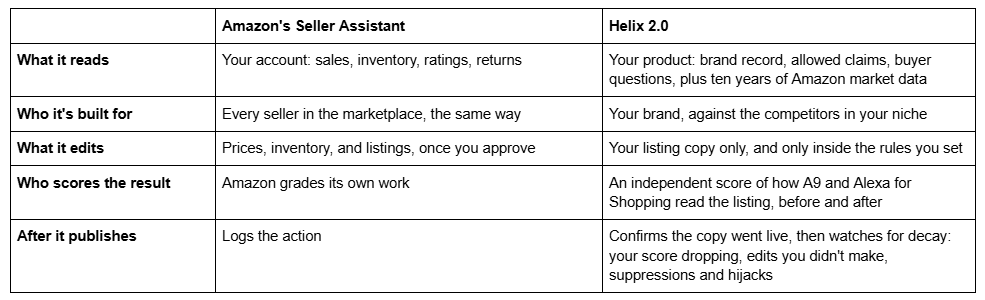
So the split is simple. Let Amazon's agent run the store, and let Helix engineer your listings and keep them yours.
Why Helix 2.0 is worth your attention
Six things change for you from the day you connect.
- Your listings are watched, not just written. Helix keeps an eye on every listing you choose to manage and alerts you when something matters: your score drops, the copy changes and it wasn't you, the listing is suppressed, the Buy Box goes to someone else, or the listing disappears. Listing decay stops being something you discover in your sales report.
- You always know which listings need work first. Connect Seller Central once and your whole catalog comes in and gets scored, highest-revenue listings first. Your first hour goes where the money is, and the scores tell you where to spend the next one.
- One listing works for keyword search and for Amazon's AI. Each run engineers the copy for A9 and for the answers Alexa for Shopping gives, and each run comes with a before-and-after score, so you see on evidence what the work did.
- Your brand stays in your words without you checking every line. You set rules for your brand and each product, they travel with every run, and anything that breaks one is stopped before it publishes.
- Publish from Helix, and know it landed. Review the before and after side by side, publish to Amazon in one click with child variations included, and Helix reads the live listing back to confirm your copy is really there.
- Your own AI tools plug straight in. Every Helix subscription includes MCP, the connector that lets the AI tool you already use work with your Amazon data and with Helix.
Helix has already engineered 3,000+ listings for 500+ brands in the US and UK. Agencies handling $200M+ in client revenue use it to cover whole client catalogs without adding people to check listings by hand.
See How Helix 2.0 Works → See how Helix 2.0 runs on your own catalog, highest-revenue listings first. Helix is currently available for US and UK Amazon marketplaces, with additional marketplace support in development.
Your AI can now read your seller account. Give it your product too.
If you already run part of the business through Claude, the plugin is a real convenience. Your Amazon sales, inventory and listing data sit next to your accounting and supplier sheets. So a question like which of my top ten products is losing margin to ad spend stops being three exports and a spreadsheet.
What the plugin hands your AI is your numbers. Connect Helix through MCP as well, and your AI also gets your product. That means your brand records, the claims you must never make, the engineered copy behind each listing and the market data underneath. Ask a question that needs both, and the answer gets better because your AI now knows your product, not just your sales figures.
Before Q4, split the work
Q4 opens October 1, and Prime Big Deal Days follow on October 6 and 7. It's the quarter an always-on agent has the most to do, which makes this the right week to decide what it does and what it doesn't.
- Hand the agent the store. Reorders, price alerts and drafted review responses are the work it does well, so approve those quickly.
- Keep the listing out of auto-approve. Anything that edits your title, bullets, images or Item Highlights deserves a read, because both A9 and Alexa for Shopping rank and answer from that text. Nine in ten recommendations get accepted. Listing edits should be the ones you read before saying yes.
- Engineer the listings that carry your quarter, then keep them watched. Start with the handful of products that bring in most of your Q4 revenue. Q4 is when listing decay costs the most, because every competitor in your niche is changing copy and prices at once. If you want a number first, the free AI Readiness Score reads any live US or UK listing, and Helix scores the same listing again as your before number the day you connect.
Amazon's agent will keep getting better, and it will get better for your competitors at the same rate. What it can't give you is a listing that stands apart, because it is working on every seller's listing at the same time. Let the agent run the store, and engineer the listing yourself.
Engineer Your Listings → Connect Seller Central once and see your top listings scored, highest revenue first. Helix is currently available for US and UK Amazon marketplaces, with additional marketplace support in development.