


Three years ago, a brand owner logged into Seller Central and found that the title on one of their listings had been rewritten overnight. They hadn't touched it. Amazon's AI had, stamping the listing with the wrong model year and the wrong dimensions. Nothing about the product had changed, but its title no longer described it.
As of July 27, 2026, that scenario is no longer rare. Amazon now caps product titles at 75 characters in every category except media, and any title still over the line gets rewritten automatically, on Amazon's schedule, by a model that keeps what it judges matters and drops the rest. If you prepared ahead of the deadline, good. This piece is for the moment after, when the rewrite has already happened and the title staring back at you isn't the one you would have written.
Here is what is worth understanding before you try to fix it: Amazon's AI cut your title blind to your own data. It filled 75 characters on generic signals, with no idea which of your keywords were actually holding your rank. The field is still yours to fill, though, and taking the title back is a workflow rather than a plea. What follows walks it end to end: why the rewrite went wrong, how to reclaim the field, how to decide what fills it, and how to prove the fix worked.
Why did Amazon rewrite my title?
Start with why the program exists at all, because Amazon's stated reason is only half the story. Officially, the 75-character cap is about mobile screens and consistency with other retailers. But look at the shape of the change - a trimmed title plus Item Highlights, a new searchable field built to hold short attribute phrases - and a second motive is hard to unsee. In May 2026 Amazon launched Alexa for Shopping, an AI surface that answers shoppers directly instead of handing them a results page, and an AI that answers questions runs on structured data, not 200-character keyword strings. Amazon hasn't drawn that line publicly, but the rewrite reads like a restructuring exercise as much as a formatting one: the model isn't just shortening your title, it's reshaping your listing into a format its own AI can read.
That explains the rule. It doesn't explain why rewrites go wrong. The wrong year and the wrong dimensions came from an earlier program than the one enforcing the cap today, but the failure mode is the one you are dealing with now: the model writes from the signals it has, and those signals are Amazon's own catalog data and generic relevance patterns, not your Search Term Report. The enforcement model just adds a target - fit the title into 75 characters. The rule itself is simple, and if you want the full mechanics we cover them in our guide to the 75-character title limit. What matters here is the consequence.
The AI optimizes for one thing, a compliant and readable title that fits the box, and it has no way of knowing which three keywords out of your forty are the ones actually carrying your organic rank, because your performance data is invisible to it. So when it trims, it trims blind. It might keep a broad category term that shoppers rarely type and drop the exact-match phrase that ranks you on page one. To the model, both are just words. To your listing, one of them is the difference between position four and position forty.
That is why the cost of a bad rewrite is rarely cosmetic. On the Seller Central forums, brand owners hit by those earlier rewrites described logging in to find their titles turned into near-gibberish that described a different product than the one in the box. A title that no longer matches what you sell does two kinds of damage at once, dropping the keywords that were holding your rank and putting wrong information in front of the shoppers who read it before they buy. The rewrite reads as a formatting update. It lands as a ranking and conversion event.
Can I change my title back after the AI rewrote it?
Yes - and you have more control today than the seller who found that wrong-year, wrong-dimensions title had back then, when the only recourse was a support case that went nowhere. The path depends on one thing, which is whether you are enrolled in Brand Registry.
If you are a brand owner, Amazon gives you a 14-day window to review the change before it goes live. Here is the path, in order:
- Open Review Listing Changes. The AI's proposed title lands in this dashboard, which tracks every Amazon-initiated change across your brand's ASINs. That assumes the dashboard is up - in the weeks before enforcement, sellers reported it wasn't.
- Can't see it? Fix the permission first. The dashboard requires the Brand Representative selling role for your brand. Your account's primary user grants it under User Permissions → Manage Permissions → Brand Benefits → Review listing changes.
- Find the pending change and note its "Soon to be published on" date. That date is your real deadline, so put it on your calendar the moment the notice lands. Respond before it or Amazon applies its version automatically.
- Accept, modify, or reject - and approve nothing by default. Check the proposed title against the keywords you know carry your rank before you touch any button.
Separately, you can preview what the AI would recommend for any listing at any time under Manage All Inventory → Edit → View Enhancements. That view is useful for triage, but the pending changes on the 14-day clock live only in Review Listing Changes, and that is the queue to work.
If the window has already closed, or you were never brand registered, you have less leverage but not none. Amazon does not lock the title field, so you can edit it yourself at any time, even after a rewrite has taken effect. Before you do, open View Change History on the listing to see exactly what the AI altered, because you cannot rebuild what you can't see was removed. The catch is that your exact original cannot come back if it ran past 75 characters: the cap makes it non-compliant the moment you re-enter it.
So don't burn days on a support case asking Amazon to put the old title back - there is nothing compliant to put back. Treat the reclaim as a reconstruction, not a restoration: the field is yours to edit, the ceiling is fixed, and the real decision is which of your keywords earn the 75 characters you have. And if this rewrite caught you outside Brand Registry, take that as the advice it is: enrollment is what buys the 14-day buffer on every future rewrite, and it carries the rest of the brand toolkit with it - A+ Content for conversion, trademark protection, and in general more say over your own catalog. It is faster than its reputation, too: Amazon accepts a pending trademark, a fresh filing draws its serial number within days, and sellers report Registry access inside a week or two of filing. Enforcement rolls through your listings gradually, so enrolling now still puts the buffer in front of the flags that haven't landed yet.
The rewrite is a keyword decision, and Amazon made it blind
Reclaiming the field is the easy part. Deciding what goes back into it is where the real work starts, and it is harder than the AI treated it as, because cutting a title to 75 characters isn't a formatting decision but a keyword-prioritization one, and only your own data can make it well.
Here is the wedge. A general-purpose AI, Amazon's included, cannot see which of your keywords hold your rank, because it has no access to the search-term data that shows which queries actually convert into sales on your listing. It can guess from category norms, but it cannot know that "insulated 32 oz" is the phrase carrying 60% of your organic sales while "stainless water bottle" barely moves. You can know that, because the data is yours. That asymmetry is the whole game: the cut Amazon made blind, you can make on evidence.
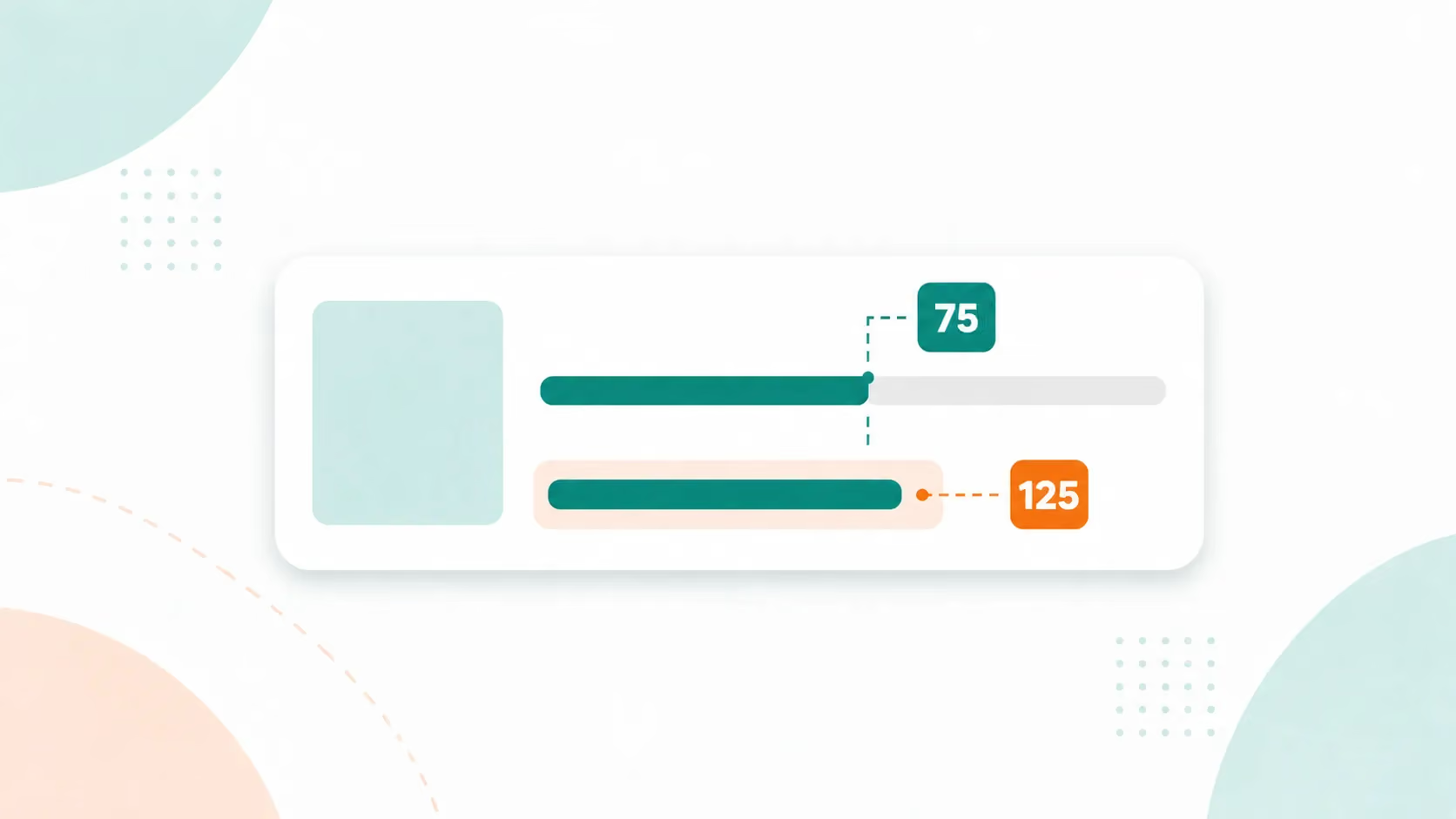
The method is to rebuild your rank-carriers across three surfaces instead of forcing them into one. The 75-character title holds your product identity and your single strongest converting term, the one phrase you cannot afford to lose. The rest move to the Item Highlights field, the 125 searchable characters shown below the title in search results and on the product page, and to your backend search terms, where they stay discoverable without crowding what shoppers read. This is what Listing Engineering means in practice: structuring a listing deliberately for both engines that read it, the A9 keyword engine that still ranks you and Alexa for Shopping, which now answers shoppers, both pulling from the same listing.

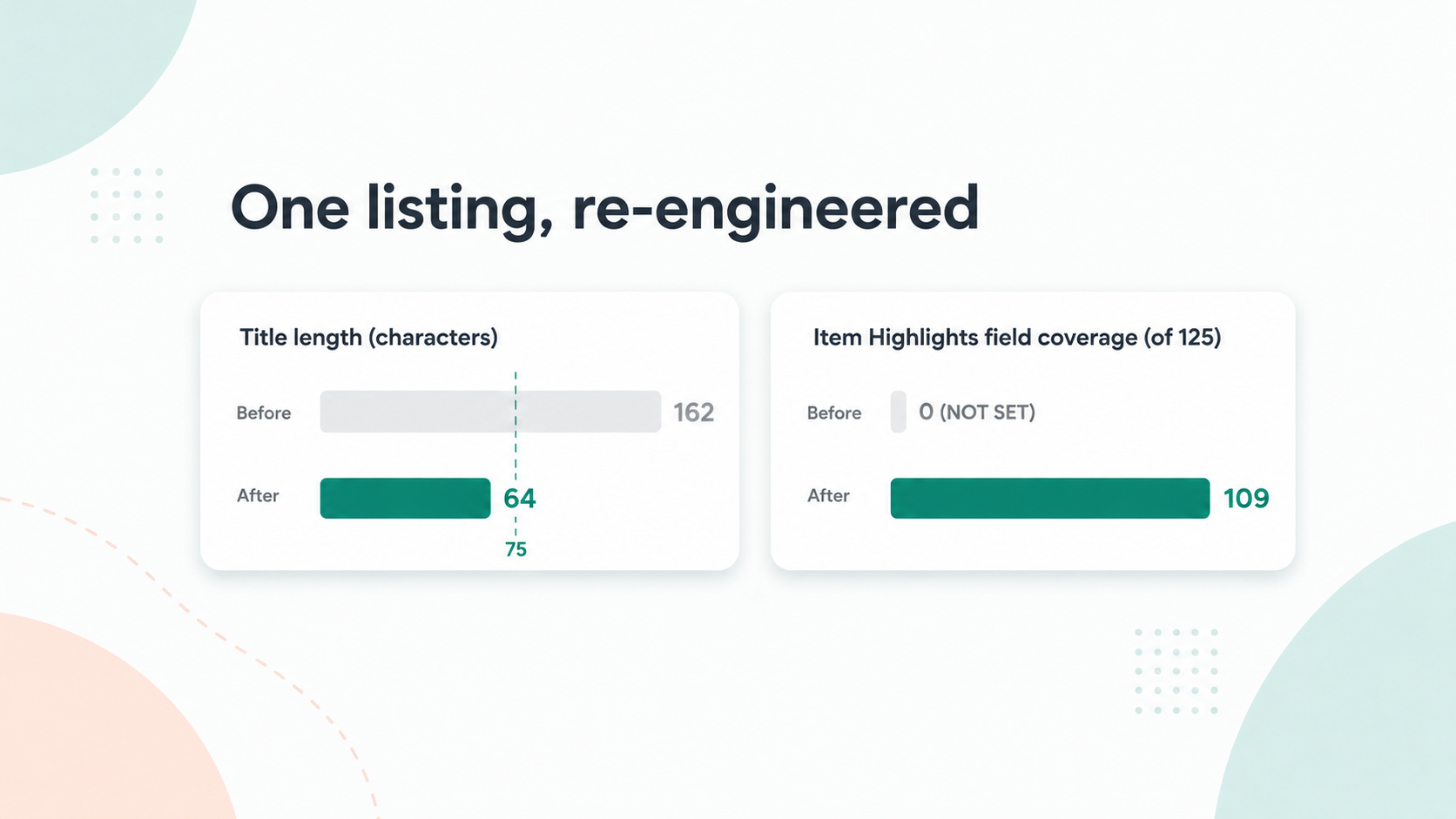
We ran this on a real listing recently. The title had ballooned to 162 characters over the years, and its Item Highlights field was not set at all. Cut to a disciplined 64-character title with the rank-carriers rebuilt into a filled Item Highlights field, the listing's field-coverage read climbed to 109 out of 125. The keywords didn't disappear; they moved to a room built to hold them.
One honest caveat before you start: this is per-listing work. The keyword evidence is different for every ASIN, so a catalog of forty listings is forty separate prioritization decisions, each made against its own search-term data - and Amazon's flags will not wait for you to finish. If your catalog is large, triage by revenue: reclaim the listings that carry your sales first, let the long tail run on the AI's version temporarily, and rebuild those on your own schedule. Scale is the real constraint of the reclaim, and it is worth deciding up front whether you are doing this by hand or handing it off.
Before you rebuild the title by hand, see where your listing stands - a free check that reads your live listing and flags exactly what the 75/125 rule is missing, so you rebuild from evidence instead of memory.
The reclaim isn't finished until the score moves
You know the reclaim worked when the numbers move, not when the title looks right to you. A title you rewrote but never measured is a title you are still guessing about, which is exactly what a before-and-after read fixes.
The instrument for that read is the AI Readiness Score, a free check that reads any live listing and returns a 0-to-100 read on how well it answers what Amazon's AI discovery asks, including the 75/125 compliance gap the enforcement created. Score the listing before you touch it, so you have a baseline, then score it again after you rebuild the title and Item Highlights, and the gap between the two numbers is your evidence the reclaim did something. Across more than 5,000 live listings the median score is 65 out of 100, which breaks into a COSMO half at 70, from Amazon's knowledge graph that reads your listing as product relationships, and an Alexa for Shopping half at 54, from how well the listing answers the questions that surface puts to it. A rewritten listing that reads well on both halves is one built for how Amazon now finds products, not just how it used to rank them.

Then watch the two signals that tell you whether it worked: organic rank on your rebuilt keywords, and the sessions that follow it. Nobody outside Amazon knows yet how the new system splits ranking weight between the title and Item Highlights - enforcement is too new for that data to exist - so give the listing weeks of measurement rather than a verdict in days. If the score climbed but rank didn't, you have a specific, testable punch-list of what the field is still missing, rather than a vague sense that something is off.
Frequently asked questions
Can I change my Amazon title back after the AI rewrote it? Partly. Brand-registered sellers can accept, modify, or reject the change in the Review Listing Changes dashboard during the 14-day window before it goes live. After that window, or without Brand Registry, you can still edit the title yourself at any time - but an original that ran past 75 characters cannot be restored, so the fix is rebuilding the best compliant version, not re-entering the old one.
What if I missed the 14-day review window? The change applies automatically, but the field isn't locked, so you can edit the title again immediately. Keep your new version inside 75 characters - an over-limit title either won't save or goes straight back into the AI rewrite queue, and either way you lose the field again. Your exact original can't come back if it was over the limit, so rebuild it: your strongest converting keyword in the title, the rest into Item Highlights and backend search terms.
Can Amazon restore my original title? No. The 75-character cap is standing policy now that enforcement has begun, so an over-limit original has nowhere to come back to - restoring it would only make the listing non-compliant again. What you control is what fills the field: rebuild the best compliant title from your own keyword data, and move the displaced keywords into the 125-character Item Highlights field and your backend search terms.
Will my keyword ranking recover after I fix the title? No one can promise that yet, because no one outside Amazon knows how much ranking weight the new system gives the 75-character title versus Item Highlights - enforcement is too new for recovery data to exist. What is in your control: get the rank-carrying keywords back onto the indexed surfaces (title, Item Highlights, backend search terms), then measure. Score the listing before and after, and watch organic rank and sessions over the following weeks. If rank doesn't move, the score tells you what the listing is still missing.
What to do the next time a change notice lands
The next title Amazon flags in your catalog is a matter of when, not if, because enforcement rolls through your listings gradually on its own schedule. So the muscle worth building now is the response. The moment a change notice lands, you open the listing, check what the AI proposed against the keywords you know are carrying your rank, and decide on evidence instead of letting the 14 days run out. The seller who found the wrong-year, wrong-dimensions title didn't have a rare problem. They had an early one.
That is the whole reclaim in one line: Amazon's AI cut your title blind to your own data, and you take it back by rebuilding the 75 characters and the Item Highlights on the keyword evidence the AI never had. The first step is knowing exactly what the rewrite cost you.
Run Your AI Readiness Score to see exactly what Amazon changed and what your listing is now missing. Run Your AI Readiness Score → We analyze only your public listing data, charge you nothing, ask for no credit card, and never send spam.
Or, if the by-hand math doesn't work for your catalog, hand the rebuild to Helix™, ZonGuru's Listing Engineering service. Helix works in bulk, across the catalog rather than one flagged title at a time, and it engineers each rebuild against a decade of proprietary niche, keyword, ranking, and sales-velocity data - market history Amazon's rewrite model never saw. The result is a listing built for both engines, not patched to fit the box. Available for US and UK marketplaces.


.avif)