


This guide does two jobs.
The first is the calendar. Amazon published every Q4 date in its July 7 notice to sellers, "Holiday 2026: Same fees, same eligibility, earlier deadlines." The dates work the way they did in 2025, just a week or two earlier. We'll walk through all of them: deal windows, arrive-by dates, and peak fees.
The second job is the reason this guide exists. In May 2026, Amazon launched Alexa for Shopping, an AI assistant built into the main search bar. A shopper looking for a gift no longer has to scroll a results page. They can ask, "what's a good water bottle for a brother who runs?" - and the AI reads product listings to decide which ones belong in its answer.
That creates a deadline the calendar doesn't show. Your listing has to answer shopper questions before your stock arrives at Amazon - September 9 for Prime Big Deal Days, October 21 for Black Friday. Here's why the deadline falls there: the day your units check in, your offer is buyable again. It's back in organic placement, back in your ad campaigns, and back in the pool the AI recommends from. Every shopper who arrives between check-in day and the event reads whatever your listing says at that moment. If you fix the copy in November, the old copy has already answered - or failed to answer - weeks of shopper questions.
The good news: this isn't a new date to hit. You're already working to the arrive-by dates for the stock itself. The listing just has to be ready by the same day.
Key takeaways
- Shoppers ask before they scroll. Alexa for Shopping answers questions in the search bar by reading listings. It can only recommend what your listing lets it understand.
- Your listing's deadline is your stock's arrive-by date. Finish the readiness pass on each hero ASIN before its inventory checks in.
- You control one of the AI's three sources. It reads the shopper's profile, Amazon's knowledge graph, and your listing. Only the listing is yours.
- Most listings say what a product is, not what it's for. Across 5,000+ AI Readiness Score reports, the what-it-is half averages ~70; the what-it's-for half averages ~54. Gift questions land in the weak half.
- The AI remembers your prices. Shoppers can ask for a year of price history, so a fake October anchor price is now visible to anyone who asks.
- Ads run inside the AI's answers. Sponsored Prompts have billed Sponsored Products campaigns automatically since March 25, 2026.
- A stockout removes you from the conversation. Automatic reorders and AI recommendations only act on in-stock items.
- Plan on conversion, not sessions. On Prime Day 2026, product-page traffic fell 10.3% while unit conversion rose 17.1%.
- A holiday keyword refresh is not the fix. Filled attribute fields and bullets that name the user, the use, and the moment are.
Let’s cover the basics first.
When does Q4 2026 actually start for Amazon sellers?
Q4 starts in September, because that's when the first hard deadlines fall. Three dates from the July 7 post anchor everything else:
- September 8 - Prime Big Deal Days deal submissions close.
- September 9 or 16 - Prime Big Deal Days stock must reach FBA.
- October 15 through January 14, 2027 - peak fulfillment fees apply.
Deal windows
Both deal windows opened on July 8. Lightning Deals and Best Deals for Prime Big Deal Days must be submitted by September 8; the $50 early-submission discount for that event ended on August 5. The Black Friday Week and Cyber Monday window stays open until October 20, and its $50 discount is still available if you submit by September 5.
Each promotion costs $100 upfront, plus 1.5% of promotional sales, capped at $5,000.
Pro tip: if your Black Friday shortlist isn't in yet, submit it by September 5 to save $50 per deal. You can refine the deal prices later.
Arrive-by dates
Each event has three arrive-by dates, depending on how your stock reaches Amazon:
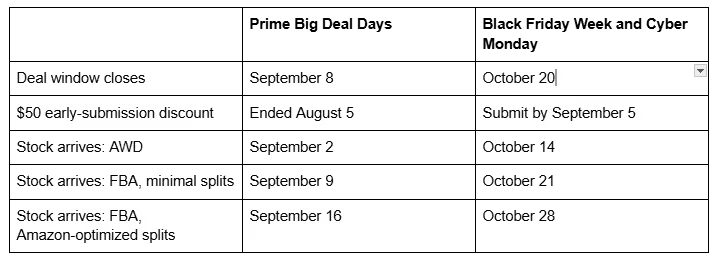
AWD is Amazon Warehousing and Distribution - Amazon's bulk storage that feeds FBA. With minimal splits, your cartons go to a few warehouses. With Amazon-optimized splits, they go to more.
Amazon gives no separate arrive-by date for Christmas. That makes October 28 the last inventory date it has put in writing for the season.
Peak fulfillment fees
Peak fees run October 15 to January 14 and apply to FBA, Remote Fulfillment with FBA, Multi-Channel Fulfillment, and Buy with Prime. The increase averages $0.32 per unit, and the 3.5% fuel and logistics surcharge applies on top. Both numbers are already published, so you can run them through every hero ASIN's margin now - in August, not in an October settlement report.
The event dates themselves
Thanksgiving falls late this year, on November 26. That puts Black Friday on November 27 and Cyber Monday on November 30.
One date is still missing: Amazon has not announced when Prime Big Deal Days will run. The July 7 post says only that the event "returns at the same time as last year," which was early October. The 2024 event was announced on September 16 and the 2025 event on September 15 - about three weeks before each ran - so expect a mid-September announcement. Until then, any printed October date is a guess.
Reading this in September? The Prime Big Deal Days window has likely already closed. Build your plan around the Black Friday dates instead: October 20 for deals, October 21 for stock.
What should the Q4 inventory plan look like?
Build the plan backwards from the arrive-by dates. Subtract supplier lead time, production, freight, and receiving from September 9 (or October 21), and you land in July and August. That's why the plan starts before the season does.
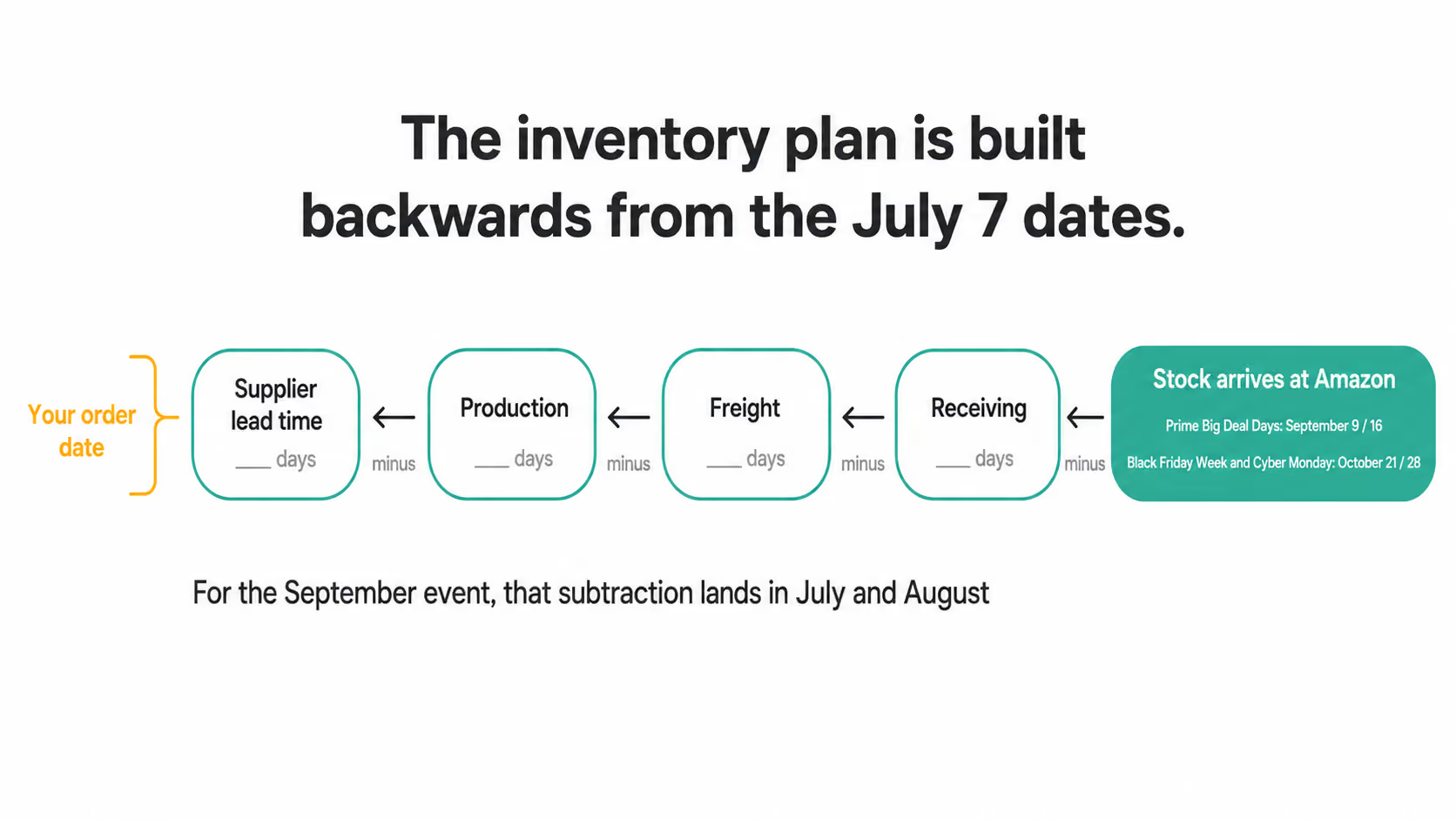
The forecasting itself hasn't changed:
- Forecast by ASIN. Take each hero ASIN's weekly unit rate through last Q4 and apply your own multiplier for this year. Use your numbers, not a figure from a guide.
- Split your shipments. One late carton shouldn't strand a whole product.
- Check capacity now. Review your storage limits and your Inventory Performance Index - the score Amazon uses to set those limits. A capacity request takes time the calendar no longer has.
- Run the peak fee through your margins. $0.32 per unit on average, plus the 3.5% surcharge, on every unit shipped inside the window.
Pro tip: choose the Amazon-optimized split only if the earlier date is already comfortable. The later arrive-by isn't extra slack - the wider split also puts your stock on sale about a week later. If September 9 feels tight, the minimal split is the safer plan.
Stockouts now cost more than the lost days
There's a new reason to hold buffer stock, and it comes from Amazon's own features. Alexa for Shopping lets shoppers set Scheduled Actions that restock "regular household items like pet food, paper towels, and detergent" on a repeating schedule. Conditional buys work the same way: "add this sunscreen to my cart if the price drops to $10 and I haven't purchased it in the last 2 months."
Both features act only on in-stock items. A product that runs out drops out of those automatic reorders, and the AI can't recommend something that isn't for sale. Amazon hasn't explained how the AI treats a product once it comes back into stock - so size your buffer against losing the conversation, not just the days of sales.
Monitor daily through the peak. A rank tracker that flags a drop the morning it happens is enough. Pair it with a listing alert that catches a review swing or a hijacker - another seller attaching itself to your listing.
Deals, pricing, and ads: what still works and what changed
Every Q4 guide pulls these three levers, and all three still move units. What's different this year is what each lever can hide, and what it can buy.
Deals work exactly as they did last year. The fees, approval process, and display are unchanged. Our comparison of Lightning Deals and Prime Exclusive Deals covers which format suits which margin.
Pricing lost its favorite trick. Amazon's launch page lists a full year of price history among the things a shopper can ask the AI about. Checking price history used to require a browser extension; now it's a question typed into the search bar. Raising your anchor price in October to inflate the Black Friday discount no longer goes unnoticed - anyone who asks will see the discount you actually gave.
Pro tip: keep a clean price record on every hero ASIN for 60 to 90 days before the event, so the discount the AI reports is the one you meant to give.
Ads moved inside the conversation. Sponsored Prompts are Amazon's paid placements within AI shopping conversations, billable on a cost-per-click basis since March 25, 2026. Sponsored Products campaigns are enrolled automatically - if you run Sponsored Products, you're already buying them. The only control Amazon describes is pausing a prompt. Andy Jassy told investors that shoppers who click a sponsored prompt convert 48% more often and spend 21% more on average - though that stat compares engaged shoppers with everyone else.
Pro tip: before the peak, open the Prompts report in the ad console and check what those clicks cost and convert on each hero ASIN. Pause the prompts that aren't paying back. New to the report? Our guide to Amazon's Prompts report shows where it sits.
On budget, the standard advice holds: start the ramp in October, raise budgets gradually, and expect a higher cost-per-click through the peak. Set your range from your own numbers last Q4.
This year there's a fourth lever: the listing itself. A deal on a listing that can't answer a gift buyer's questions buys traffic to a page the AI won't vouch for. Your deal shortlist is therefore also your readiness shortlist - and the listing work has to be finished before the traffic arrives. The rest of this guide covers that work: what the AI reads, what it finds on a typical listing today, and how to fix the gaps.
How does Alexa for Shopping decide which product to recommend?
When a shopper asks a question, the AI draws on three sources. You control exactly one of them.
- The shopper's own profile. Amazon's About You profile is the record it keeps on each customer, built from what they've said and bought over time. You will never see it.
- Your listing. The AI pulls its answers from your title, bullets, attribute fields, and A+ Content - the brand section lower on the page. This one is yours.
- COSMO, Amazon's knowledge graph. COSMO reads your listing as a set of facts: who uses the product, what it goes with, what it's made of, what it replaces. Amazon's research paper lists fifteen fact types, and our COSMO guide covers them in depth.
None of this replaced the results page. A9, Amazon's keyword search engine, still ranks it and still decides where you sit when a shopper scrolls. The AI simply answers above that ranking - and both systems read the same listing. Neither has a second document to fall back on. For the full picture of how the layers fit together, see our breakdown of Amazon's AI shopping stack and our guide to Alexa for Shopping for sellers.
Gift buyers are where this bites hardest in Q4. Their questions are about the recipient, not the product: Who is it for? Does it suit someone who already owns two? What's the catch? And those shoppers are worth winning - in its July 30 quarterly results, Amazon said US customers who use Alexa for Shopping spend over 40% more per order than those who don't.
So what does the AI find when it goes looking for answers on a real gift listing? We checked.
The gift buyer's questions your listing can't answer
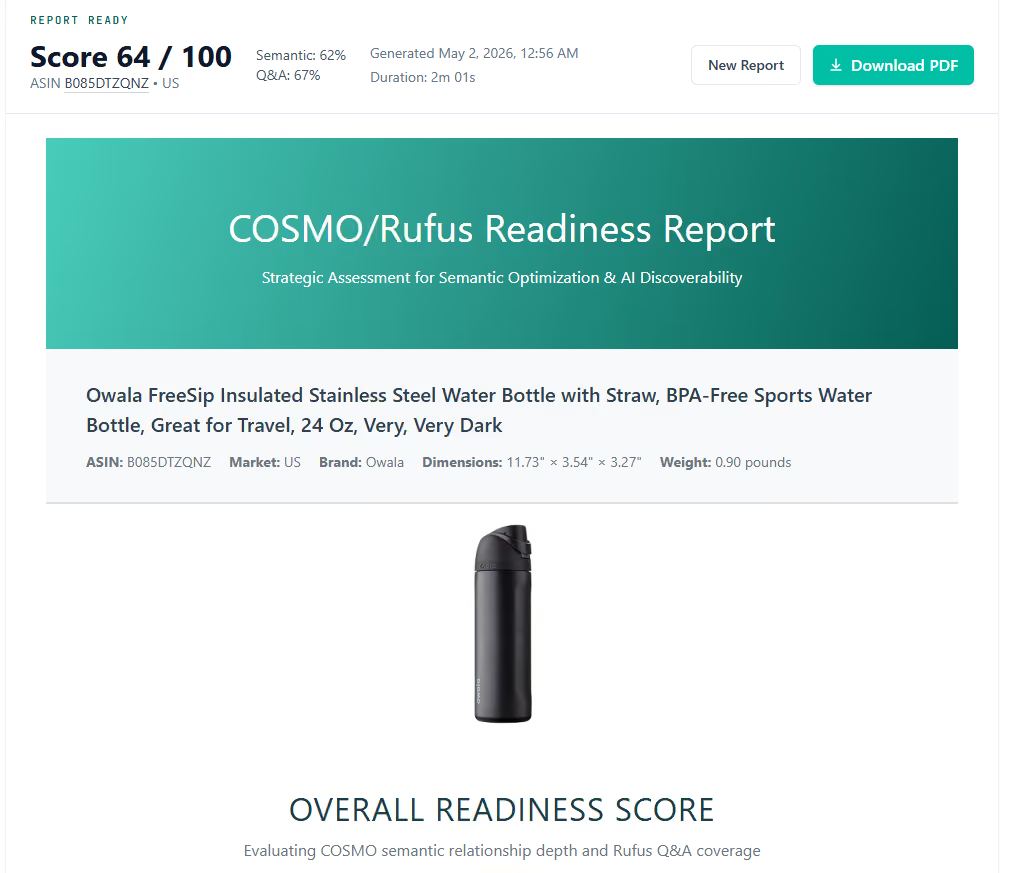
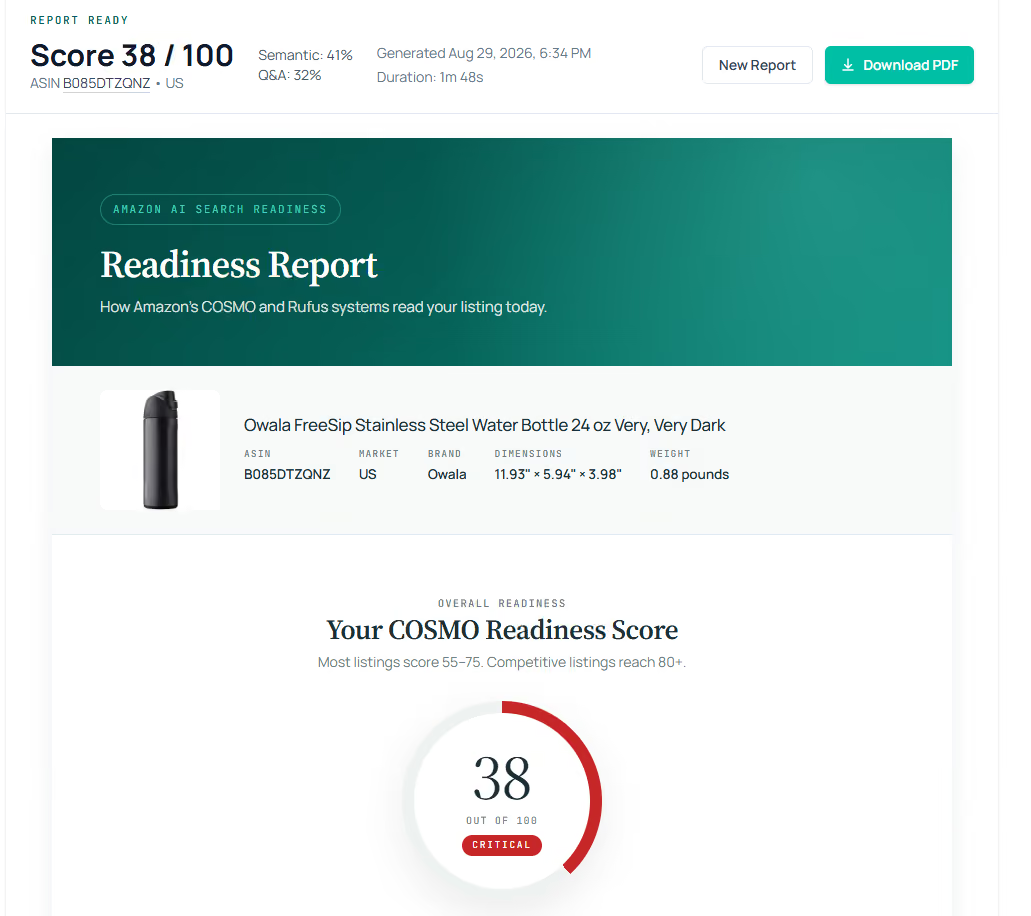
Take the Owala FreeSip, a water bottle that sits on a lot of gift lists. We scored the listing for its "Very, Very Dark" color (ASIN B085DTZQNZ) twice with our free tool, the Amazon AI Readiness Score - on May 1, 2026, and again on August 29. The two runs tell different stories, and the second one is the reason to check your own catalog this week.
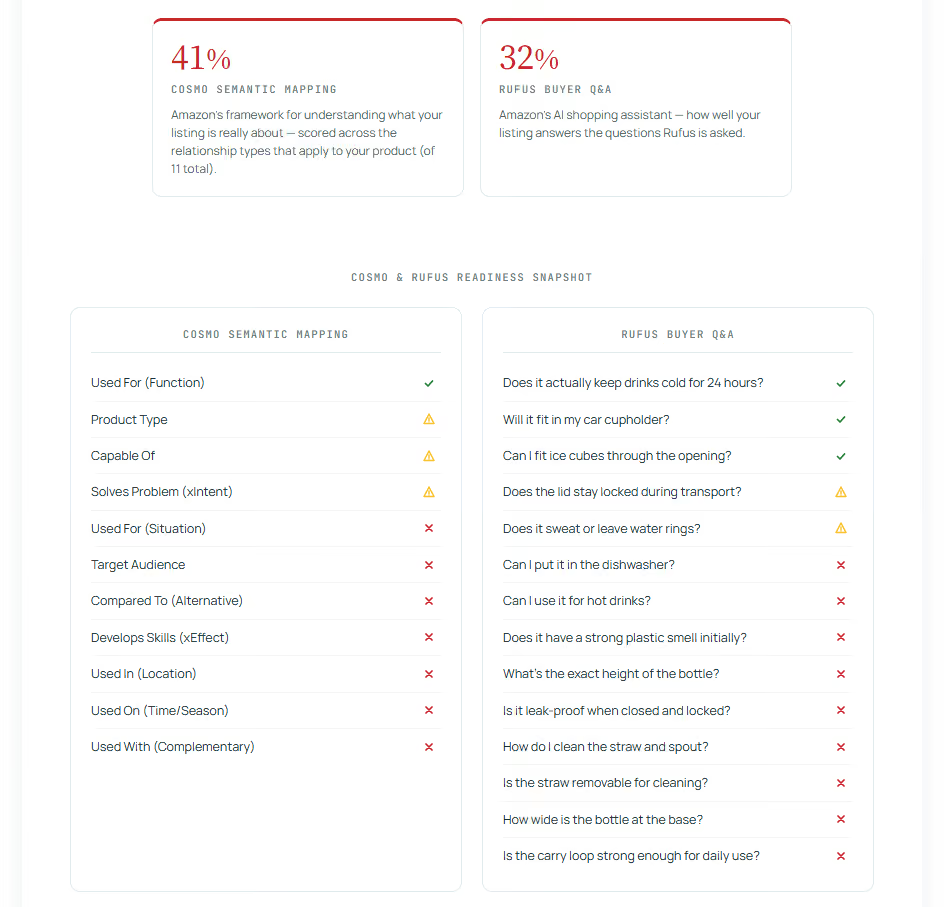
The May run: a decent listing with gift-buyer blind spots. The Score put fifteen shopper questions to the listing, and it answered five in full. Some answers were genuinely good - the lid was labeled dishwasher-safe, the cup hand-wash only, and a bullet warned against hot liquids. The listing scored 64. The gaps were the gift-buyer ones. Nothing anywhere about replacement straws. Nothing on whether the straw comes out for cleaning. And while the carry loop got a mention, nothing said whether it holds up to daily carry. Those are exactly the questions a December buyer asks about a bottle they've never held, for a person whose habits they only half know: can the part that wears out be replaced, how do you clean it, will it survive a backpack. Every unanswered one is a question the AI can't answer from this listing - so it answers from another listing, or leaves the product out of the conversation.
The August run: same product, 26 points lower. By August 29 the listing scored 38 - down from the middle of the Adequate band into Needs Work. Nothing happened to the bottle. What happened is the title. Sometime between the two runs it shrank from about 135 characters to 64, in line with the 75-character cap Amazon began enforcing on July 27. The words that disappeared - Insulated, with Straw, BPA-Free, Sports, Great for Travel - were carrying real semantic weight: they told the AI what the product is made of, what it's for, and when it gets used. Item Highlights, the field Amazon created to catch exactly those phrases, sits empty. The bullet that answered the dishwasher and hot-liquids questions is gone too, so both moved into the unanswered column. The August listing fully answers three questions and leaves nine open.
Whether Amazon's auto-rewrite shortened the title or the brand accepted a suggestion, the public record doesn't say. The result is the same either way: a listing that was Adequate in spring is entering Q4 answering fewer questions than it did in May - and unless someone at the brand re-checked, nobody knows.
How the Score reads a listing
The Score is a 0-100 measure of how well a live US or UK listing answers what Amazon's AI asks. It has two halves, because the AI's two readers want different things:
- COSMO Semantic Mapping measures whether the AI can tell what the product is. Owala scored 62 in May, 41 in August.
- Alexa for Shopping Q&A Coverage (the report labels this half Rufus, the assistant's pre-merge name) measures whether the listing answers what the product is for - the questions shoppers actually type. Owala scored 67 in May, 32 in August.
The bands: Strong runs 80-100, Adequate 50-79, Needs Work below 50. Notice which half fell furthest. The what-it's-for score dropped 35 points, because the deleted title phrases and the lost bullet were mostly use-and-care answers - the very half gift buyers live in.
Across the 5,000+ reports the Score has run, the benchmark total sits around 65 - but the halves split unevenly. The what-it-is score averages around 70. The what-it's-for score averages around 54. Most listings tell the AI what the product is, then leave it guessing what the product is for. Gift questions land squarely in the guessing half. Our AI readiness scoring guide walks through both halves and the bands.
A ten-minute self-test
You can run a rough version on your own hero ASIN without any tool. Write down the five questions a gift buyer asks first:
- Who does it suit?
- What does it work with?
- How is it cared for?
- What comes with it?
- What's the catch?
Now count how many the listing answers in its own words. The Owala gaps - spare parts, cleaning, durability - are the pattern to look for. And check the title while you're there: if it was over 75 characters last spring, confirm what it says now. If you'd rather have the full read done for you, you can see where your listing stands in the same two halves. We analyze only your public listing data, charge nothing, ask for no credit card, and never send spam.
How do you get a listing ready for Alexa for Shopping before October?
Take the first ASIN on your deal list and run the pass below before its arrive-by date: before September 9 or 16 for Prime Big Deal Days products, before October 21 for everything else. If the September date is already too close, aim the whole pass at October 21 and simply do the Prime Big Deal Days ASINs first.
The pass takes an afternoon per listing, and you only run it on the handful of ASINs that carry your Q4. The Owala bottle runs through each step as the example - its May score of 64 is roughly where most listings start, and its August drop to 38 is the argument for running the pass now rather than trusting what the listing said last spring.
1. Get the title under 75 characters, and fill in Item Highlights. Since July 27, 2026, Amazon has enforced a 75-character title cap in every category except media. Titles over the cap are being rewritten to Amazon's own AI recommendation, and brand owners get 14 days to accept or reject each rewrite on Seller Central's Review Listings Changes page. Check your catalog first - Amazon may already have rewritten yours. Item Highlights is the new field Amazon added alongside the cap: up to 125 searchable characters of attribute phrases shown beside the title, found in the listing editor.
This step is not hypothetical, and the Owala listing is the proof. Its title lost Insulated, with Straw, BPA-Free, Sports, and Great for Travel to the cap, Item Highlights was never filled, and the what-it-is score fell 21 points between May and August. The cap deletes semantic content; Item Highlights is where you put it back. Skip the second half of this step and you've done Amazon's compliance work while leaving your own listing poorer.
Pro tip: cut the title with numerals and unit abbreviations first - the easy characters come back fast, and that pass shows you how much real cutting is left. Then move the use phrases the title lost into Item Highlights as labeled attributes, not a sentence. Treat the field as coverage rather than rank; Amazon hasn't published how it weights it. Our guides to the 75-character limit and the Item Highlights field walk through both.
2. Rewrite the bullets to answer who, what for, and when. The Owala bullets describe the spout and the colors. A gift buyer asks who it suits, what it's for, and when it gets used. Rewrite each bullet to carry one answer: a named user, a named use, a named moment. A bullet that names the buyer and the occasion still carries keywords for A9 - and it's what the AI reads when a shopper asks who a product is for. These answers feed the half of the Score that most listings leave in the fifties.
3. Fill every attribute field. Every attribute field Amazon offers in your category is a question the AI is ready to answer. Every one you leave blank is a question it can't. Fill in material, compatibility, care instructions, what's included, and dimensions - even where the copy already mentions them. Notice that the Owala listing's three original blanks (replacement parts, straw-cleaning instructions, carry-loop durability) all live in fields, not prose.
4. Make the A+ Content informative. Comparison charts and use-case modules give the AI facts to quote. Lifestyle copy only gives it adjectives.
5. Push for reviews before the peak. Recent reviews are where buyers say what the product is for in their own words. A September review push puts fresh ones on the page before November.
6. Use images to answer size and compatibility. Show the bottle in a hand, the bottle in a bag pocket, and the straw taken apart for cleaning.
7. Clean up the backend search terms. These are the hidden keywords shoppers never see. Remove duplicates and anything already in the title, then add the recipient and occasion words the front of the listing now carries.
Pro tip: run the AI Readiness Score on your deal shortlist before the copy pass and again after it. The two halves tell you which one moved. If the what-it-is score rises while the what-it's-for score stays put, the listing has been polished rather than answered - and the second run tells you that before the traffic does. The re-run also catches the silent version of the problem: anyone who scored the Owala listing in May and filed away the 64 entered September not knowing it had become a 38.
Engineer Your Listings. The pass above takes a few hours per ASIN by hand, and across a catalog it runs out of hours before it runs out of ASINs. The free Score measures the gap; Helix™ Listing Engineering is ZonGuru's paid platform that closes it. Helix re-engineers a listing's title, searchable fields, and attributes on real keyword data, so both A9 and the AI read a listing that answers. It's currently available for US and UK marketplaces, with more in development.
Why adding holiday keywords isn't enough
Most Q4 guides recommend a simpler fix: add holiday keywords to the title and backend, write a seasonal bullet or two, refresh the A+ with gift imagery. None of that is wrong - a listing that says "gift for runners" in November is better than one that doesn't. But it's advice written for the results page, and the AI now reads the listing before the shopper ever gets there.
There's also a competitive problem: Amazon gives that refresh away for free. Its AI Listing Generator has been used by more than 900,000 sellers, and Amazon says about 90% of its suggestions are accepted. When 900,000 catalogs take the same tool's suggestions nine times out of ten, fluent copy stops being an edge. Every listing in your niche can sound good by October.
Most importantly, a keyword in a title still doesn't tell the AI who the product is for. Keyword insertion answers A9 - which still matters for the results page - but it leaves the question the shopper actually typed unanswered.
Do the holiday refresh. It's reasonable hygiene and takes a couple of hours. Just don't mistake it for the real deadline: getting the fields filled and the questions answered, live on the page, before the arrive-by date.
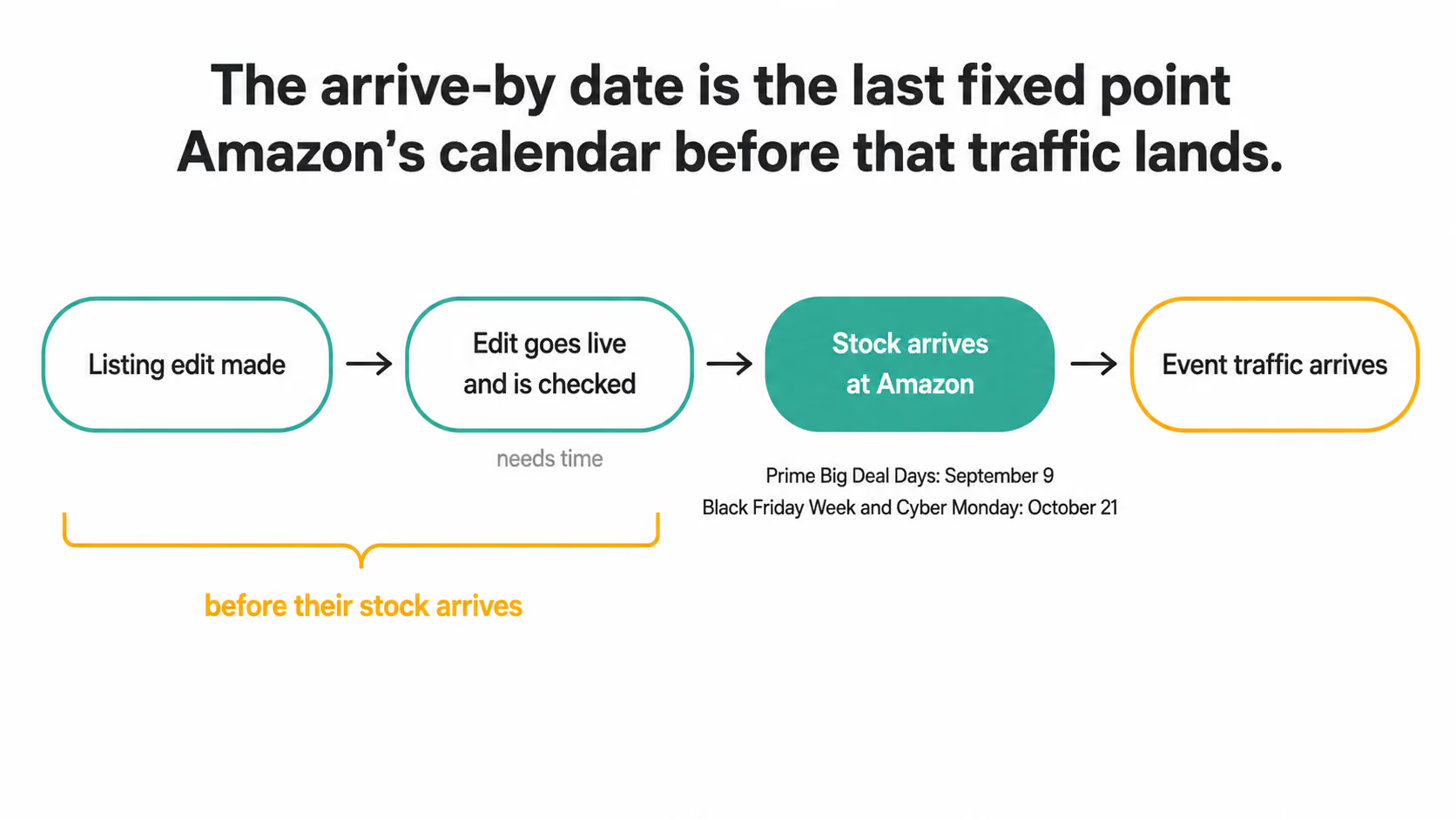
Here's the money math. By the arrive-by date, you have paid for the units, the peak fee on every one of them, and $100 plus 1.5% for each deal. All of that money resolves at the same place: a shopper asking a question, and your listing either answering it or not. Rewriting a bullet only costs a little time and changes what every one of those dollars lands on. Rewrite it before the arrive-by date and it works the whole season. Rewrite it in December and you've paid full freight to send this year's shoppers to the version that couldn't answer them.
How much of Q4 will AI shopping carry?
Already convinced the AI matters? Skip to the calendar. For everyone else, here's the evidence - with one caveat that covers all of it. These numbers come from analytics firms measuring Amazon from the outside, and from Amazon itself. They show that AI-assisted shopping grew fast and converted well; they don't prove the AI caused the sales. Read them as direction, not precision.
Holiday 2025 gives the clearest picture. Sensor Tower, an app-analytics firm, tracked Amazon's earlier shopping chatbot - the opt-in one, before the May merge - through the season. Its users made up 30% of Amazon app sessions on November 1, 40% on Black Friday, and 38% at month's end. In a later study of 60,000 US shoppers, sessions that used it converted at roughly double the rate of sessions that didn't. Adobe Analytics saw the same shape across all US retail: traffic from generative AI tools up 693% year over year. In a follow-up reported by Digital Commerce 360, AI-referred shoppers converted 31% more often than other traffic.
Since then, the chatbot has become the default. In its July 30 results, Amazon said active users of its conversational shopping tools had nearly doubled and interactions had risen more than fivefold - over 350 million customers in twelve months. Amazon is even renting the recipe to other stores through AWS's Agentic Shopping Assistant. Kate Spade's parent company built an AI gift concierge on it that asks who the gift is for, the occasion, and the style before recommending anything.
Nobody has measured the AI's share of Q4 2026 yet, and this piece won't guess. But with the assistant on by default for every signed-in shopper, there's no reason to expect it to carry less of December than it did last year.
What did Prime Day 2026 show about peak selling under Alexa for Shopping?
Prime Day 2026 ran June 23-26 - the first peak event after Alexa for Shopping launched. Amazon leaned into the change by inviting members to have the AI build them a personalized deals guide. CommerceIQ, a commerce-software firm, published a First Look at US results:
- Product-page traffic: down 10.3% year over year
- Unit conversion: up 17.1%, to a blended 20.0%
- Units sold: up 4.9%
- Ordered revenue: down 1.7%
- Ad spend: down 8.8%
- Return on ad spend: 4.78x, against 4.73x the year before
In plain terms: fewer visits, more of them ending in a purchase, roughly the same money. CommerceIQ attributes the lift as "likely due to Alexa for Shopping recommendations" - an attribution, not a measurement. But Adobe's read across all US retail agrees on the shape: shoppers arriving from AI sources converted 40% better than other shoppers, a year after converting 23% worse.
For a Q4 seller, this flips one old habit. The usual forecast multiplies sessions by a steady conversion rate - but on Prime Day, sessions fell while conversion rose. Plan your traffic expectations on conversion rather than sessions, and watch unit conversion by ASIN through Prime Big Deal Days as the rehearsal for Black Friday. Rising conversion on falling sessions is the pattern to expect this year, not a data error.
Our pre-event Prime Day checklist covers the standard prep.
The Q4 2026 readiness calendar, on one page
Here is the July 7 post's calendar, with the listing deadline added:
- September 5 - submit Black Friday Week and Cyber Monday deals to keep the $50 saving.
- September 8 - Prime Big Deal Days deal window closes.
- Before September 9 - run the AI Readiness Score on every ASIN on the deal shortlist; finish the readiness pass on Prime Big Deal Days stock.
- September 9 / 16 - Prime Big Deal Days stock arrives (FBA minimal splits / Amazon-optimized splits).
- October 15 - peak fulfillment fees begin, through January 14.
- October 20 - Black Friday Week and Cyber Monday deal window closes.
- Before October 21 - readiness pass done and live on every remaining hero ASIN.
- October 21 / 28 - Black Friday Week and Cyber Monday stock arrives.
- November 27 / 30 - Black Friday and Cyber Monday.
- Prime Big Deal Days - dates unannounced as of publication; the last two announcements came in mid-September.
The calendar kept its shape this year and moved a week or two earlier. Amazon has published every date on it. The one thing it doesn't account for is the shopper who asks the AI a question before scrolling anything - and closing that gap is the readiness pass above.
The first step takes about ten minutes, and you can do it this week: open the first ASIN on your deal list, write the five gift-buyer questions beside it, and count how many the listing answers before you touch the copy.
See Where Your Listing Stands. The dates above decide whether your product is on the shelf in December. The Score tells you whether it's in the answer. Run it on your Q4 hero ASINs before the first arrive-by. We analyze only your public listing data, charge nothing, ask for no credit card, and never send spam. The AI Readiness Score reads any live US or UK Amazon listing.
Frequently asked questions
When is Prime Big Deal Days 2026?
Amazon has not announced the dates as of publication. The July 7 post names the event, its September 8 deal deadline, and its September 2, 9, and 16 inventory dates - but on timing it says only that the event returns "at the same time as last year," when it ran October 7-8. The 2024 event was announced on September 16 and the 2025 event on September 15, about three weeks out. Plan your stock and your readiness pass to the September dates, which are fixed, and treat any printed October date as a guess until Amazon publishes one.
Is Q4 really 30-40% of an Amazon seller's annual revenue?
No published seller-side study supports that figure - it passes from guide to guide without a source. The public data is by category. The National Retail Federation puts November and December at roughly 19% of annual US retail. Census retail figures put the fourth quarter near 27% of retail overall, with hobby, toy, and game stores reaching about 35%. Your own Q4 share is in Seller Central, and it's the only number worth planning on.
Does Alexa for Shopping show ads?
Yes. Sponsored Prompts are Amazon's paid placements inside the AI shopping conversation, billable on a cost-per-click basis since March 25, 2026. Sponsored Products campaigns are enrolled automatically, and the only control Amazon describes is pausing a prompt. Amazon's Andy Jassy has said shoppers who click a sponsored prompt convert 48% more often and spend 21% more on average. Keep in mind that the placement buys a position in the conversation, not an answer - the listing still has to hold up once the shopper reads it.
What happens if my inventory misses the October 28 arrive-by?
The July 7 post gives the arrive-by dates as the dates to meet for event availability, and it makes no promise about stock that arrives after them. The usual fallback is Fulfilled by Merchant or Multi-Channel Fulfillment - shipping from your own or a third-party warehouse - which keeps the offer live. That matters more than it used to: a live offer is what keeps the product eligible to be recommended, compared, or reordered at all, since those features only act on in-stock items. Keep the listing purchasable by any route before you worry about the Prime badge.


.avif)