Starting July 27, 2026, Amazon caps product titles at 75 characters in every category except media. Go over, and you don't choose what gets cut - Amazon's AI rewrites the title for you, on its own schedule, keeping what it judges matters and dropping the rest. Most sellers are braced for that.
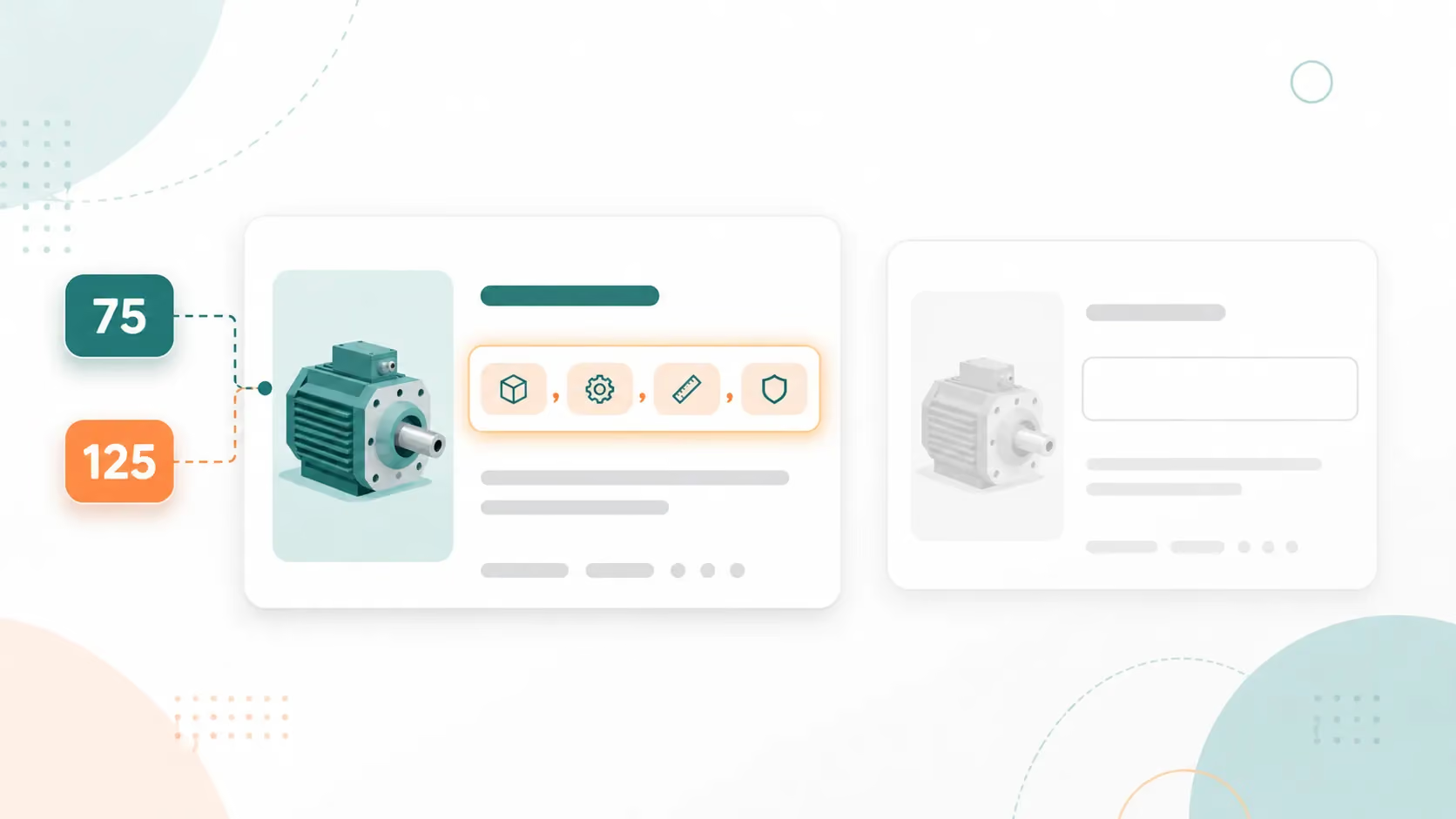
Fewer have clocked the field that arrived with it. Item Highlights gives you 125 searchable characters directly below the title, and on mobile it already shows beneath the title in search and on the product page - desktop hasn't caught up yet (for the products we tested). It exists to hold the detail a 75-character title no longer can. On most listings right now, it's empty.
The cap replaces a 200-character limit that stood, loosely enforced, for roughly a decade. Amazon's stated reason is the phone in your customer's hand: a long title gets clipped on mobile, where "every character counts," and a tighter cap matches how other online stores show titles. Once the title shrinks, the obvious move is to treat the new field as a parking lot for the keywords the title can no longer hold.
Here's the part most sellers haven't connected. That rewrite is coming to any over-length title - you trigger it or Amazon does - and Amazon's AI cuts for length and plausibility, not for which of your terms are ranking or converting. So the question isn't whether your listing gets restructured into 75/125. It's whether you steer that restructure and keep the keywords carrying your rank, or the machine guesses for you. Item Highlights is where the detail a shorter title can't hold is meant to land, which makes it the heart of that decision, not a parking lot for leftover keywords. Here's what the field is, and what Amazon wants in those 125 characters.
Key takeaways
- From July 27, 2026, titles in every category except media are capped at 75 characters, and a new field called Item Highlights adds 125 searchable characters below your title. Go over the cap and Amazon's AI rewrites the title for you.
- Item Highlights is a second searchable field, not bullet-point overflow. It's where the detail a shorter title can't hold should land - leave it blank and Amazon's AI decides what goes there instead.
- Write labeled attributes, not sentences or keyword salad. Comma-separated phrases - materials, use cases, pack and size - that say who the product is for, what it is, what it's made of, what it does, and how it's used. That's the shape Amazon's keyword engine and its AI (COSMO and Alexa for Shopping) can read.
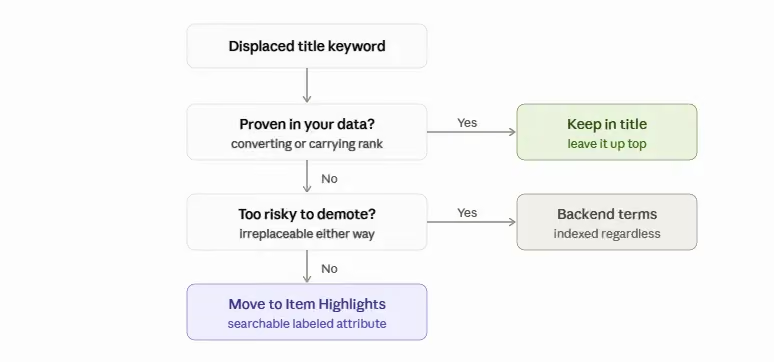
- Protect your proven keywords. Amazon hasn't confirmed how heavily it weights the field for ranking, so keep rank-carrying terms in the title and move only the rest into Item Highlights.
- Brand owners get a 14-day review window; others don't. If you're Brand Registered, approve or fix Amazon's AI rewrite before it goes live. Either way, score the listing before and after to see what actually improved.
What is the Amazon Item Highlights field?
A teeth-whitening listing shows the setup most sellers are walking into. It sat under a 162-character title - well over the cap - with five bullet points, a full description, and backend keywords, and left Item Highlights blank. Come July 27, that title gets cut to 75 whether the seller touches it or not. The only open question is who makes the cut.
The field has a specific job. It holds 125 searchable characters below your title, shown beneath your title in search and on the product detail page (live on mobile now, desktop still rolling out), and Amazon frames it as the place for materials and recommended use cases. The word that matters is searchable. A field that gets indexed and appears where shoppers look behaves nothing like a hidden attribute you fill in once and forget.
It arrived in the same announcement as the 75-character cap. Sellers have started calling the pair the 75/125 rule: a title of 75 characters or fewer, plus an Item Highlights set of 125 or fewer. The two fields ship together because they do different jobs. The title got shorter; this is where Amazon put the discoverable detail it no longer holds.
So the real problem on that whitening listing isn't only the blank field - it's the rewrite bearing down on the title above it. When the title drops to 75, everything it was carrying needs somewhere to go, and Item Highlights is the slot built to catch it. Leave it blank and Amazon's AI inherits both jobs: what to cut from the title, and what fills the field below. There's a smaller cost on top of that - in the new layout the field shows beneath the title - already on mobile - so an empty one is a blank line right where shoppers look. But the cost that should worry you is control. This is your listing's restructure, and an empty field means nobody on your side is steering it.
Item Highlights vs. bullet points, your title, and backend keywords
One seller asked in Amazon's Q&A thread whether Item Highlights was just the old bullet points renamed and shortened from 200 to 125. Reasonable question - the field is public and searchable, so it looks like a sixth bullet. It isn't.
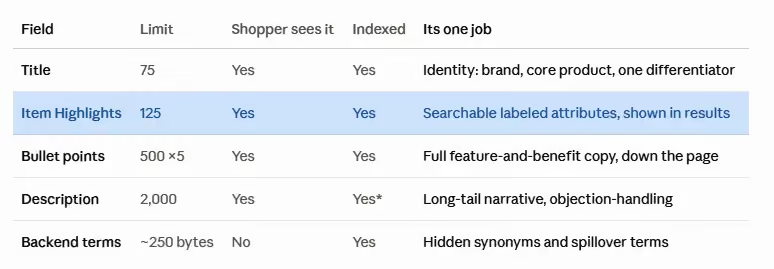
Five fields, five jobs. Your title is identity: brand, core product, and the one differentiator that earns the click, all inside 75 characters. Item Highlights is a short searchable list of labeled attribute phrases, 125 characters, shown in search. Bullet points carry the full feature-and-benefit copy further down the detail page, for a shopper interested enough to read. Your product description sits deeper still - indexed narrative copy where long-tail terms and objection-handling live, though for Brand Registry sellers A+ Content replaces it and isn't keyword-indexed. Backend search terms stay hidden from shoppers while still getting indexed.
What to put in your 125 characters
Here's what the whitening listing carried after a rebuild:
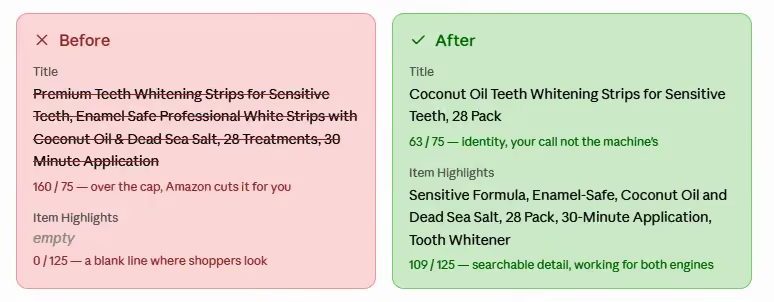
Sensitive Formula, Enamel-Safe, Coconut Oil and Dead Sea Salt, 28 Pack, 30-Minute Application, Tooth Whitener
That's 109 of 125 characters, and it's neither a sentence nor a pile of keywords. It's a set of labeled attributes, and each answers a question both a shopper and Amazon's reader ask of a product.
The method beats the vague "add materials and use cases" line every guide repeats. Amazon's AI reads a product by asking roughly six things: who it's for, what it is, what it's made of, what it does, when and how it's used, and how it's different. Map your attributes to those questions and the field mostly writes itself. The whitening string does exactly that: Sensitive Formula (who it's for), Coconut Oil and Dead Sea Salt (what it's made of), 28 Pack (what it is), 30-Minute Application (when and how it's used), Enamel-Safe (what it does). Five of the six questions, six labeled phrases - only 'how it's different' goes unanswered here, which is itself a coverage choice worth making on purpose.
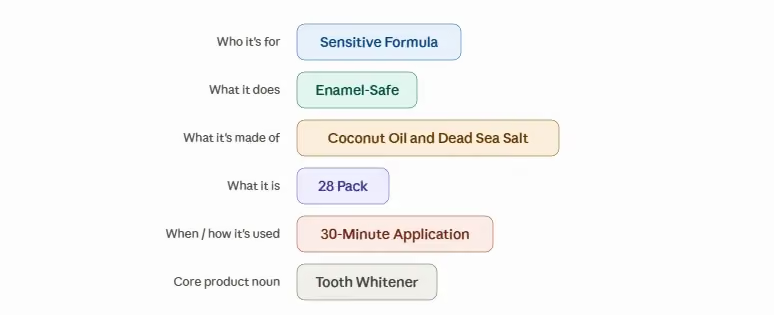
From there it's a Keep / Move / Avoid call. Keep your product's identity in the title. Move the answers to those six questions - materials, use cases, pack and size, and the unproven secondary keywords the 75-character cut displaced - not the terms holding your rank, which stay up top - into Item Highlights, which is where the keyword-rescue half of this pays off. Avoid unsupported claims, anything already in the title, and vague promotional filler.
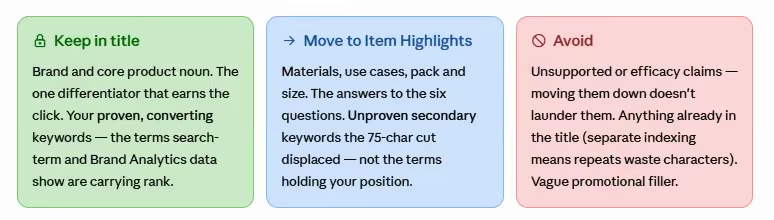
One trap is easy to miss: moving a risky or claim-heavy phrase out of the title and into Item Highlights doesn't launder it. The field carries the same content rules the title does, so a health or efficacy claim Amazon won't allow up top is no safer down here.
When the six answers won't all fit 125 characters, keep the terms shoppers actually search and the highest-volume ones the title couldn't hold, give each of the six questions at least one answer, and drop the redundant and the sentimental. This is the mapping Helix™ runs at scale - the system ZonGuru built to engineer listings against every reader Amazon points at them. You can do it by hand for a few listings. By hand is also where the limits start to show.
Write it as labeled attributes, not a sentence or a keyword dump
You have the content; the shape it takes is the next decision, and it's where most sellers miss in one of two opposite directions.
Some write a flowing sentence - "Our premium whitening strips are gentle on sensitive teeth and made with natural ingredients" - which reads fine to a person and wastes a field built for scanning. Others cram every displaced keyword into the slot until it reads as word salad. Both bury the attributes, so neither the skimming shopper nor the parsing machine can pull the facts back out.
The fix is the shape the whitening listing landed on: comma-separated labeled phrases a shopper scans in a glance and a parser reads as a clean list of claims. It's also what Amazon's own field guidance asks for - benefit-driven phrases over full sentences, no repeating what's already in the title, no keyword stuffing. Write Sensitive Formula, Enamel-Safe, 28 Pack and both readers get the same three facts without effort, and the field saves without a fight.
Why the format matters: two engines read the same field
The labeled shape isn't cosmetic. It's what the systems reading your listing consume, and there are now two of them.
The first is A9, Amazon's long-standing keyword engine that still decides most organic rank. (You'll see it called A10 in seller circles, though Amazon has never used that name.) Because Item Highlights is searchable, A9 indexes it - the keyword-rescue half of the field.
The second is newer. Amazon's AI side runs on two named systems. COSMO is its commonsense knowledge graph; Amazon's own research describes it as mapping products to uses, audiences, and buying contexts through fifteen relationship types rather than keyword strings. One nuance worth getting right: COSMO is built mostly from shopping behavior - what people search and then buy together - not by parsing your listing text. But the content you write is the raw material the relevance models draw on when they apply that knowledge to your product, so clear attributes still do real work. Alexa for Shopping, the AI surface Amazon rolled out in place of Rufus to answer shoppers' questions directly, pulls from the same listing to write its answers.
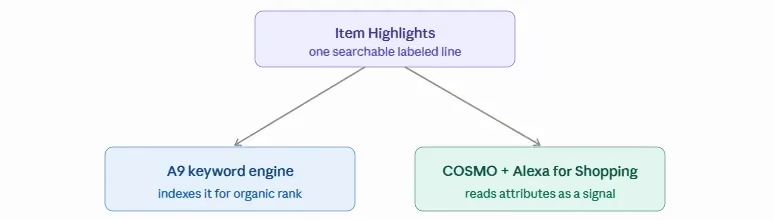
Each labeled phrase hands those systems a cleaner signal. Sensitive Formula makes who-it's-for unambiguous; Enamel-Safe makes what-it-does unambiguous. A clean labeled line is legible to both engines. A stuffed or empty one is legible to neither.
The format also unlocks a structural gain. Amazon indexes your title and your Item Highlights separately, so any keyword you repeat across both is wasted - characters spent echoing terms already indexed up top. A non-repeating labeled line earns net-new indexing for every term it carries.
The gap this closes is wider than most sellers think. The AI Readiness Score is a free 0-to-100 read of how well a live listing answers what Amazon's AI discovery asks. Across more than 5,000 live listings, ZonGuru's measurement puts the median at 65, with the COSMO half at 70 and the Alexa for Shopping half at 54. Most legacy listings already under-answer the machine, and an empty Item Highlights field widens the gap on exactly the surface where shoppers are starting to ask questions instead of scrolling.
Does Item Highlights actually help your ranking? What Amazon confirmed, and what it hasn't
Last verified June 26, 2026. This field is weeks old and still changing; we'll update as Amazon confirms more.
Both engines read the field, so sellers naturally ask whether filling it lifts rank. This is where the confident answers in circulation start to overreach, so it's worth separating what Amazon has confirmed from what it hasn't.
Confirmed, in Amazon's own words: the field is searchable, and it shows below your title in search results and on the product page; the title cap is 75 characters including spaces, every category except media, effective July 27 - live on mobile as of June 26, with desktop not yet showing it on the products we checked.
Reported but not confirmed: that the field only displays once your title drops under 75 characters. Sellers and guides repeat it, but Amazon hasn't put it in writing. Plan around it, but keep it out of the "Amazon said so" column.
Unconfirmed: how heavily Amazon weights the field for ranking. Amazon simply hasn't documented it. Some coverage fills the silence anyway - that 75 plus 125 gives you 200 characters of indexation with nothing lost; that the field carries a specific algorithmic weight under a name Amazon has never used; that it now outranks your bullets and backend terms. Amazon has published none of it. Treat all three as guesses, even when they come from a source you'd usually trust.
Why this matters for your decision: the risk concentrates on your best listings. Demote a rank-carrying keyword into Item Highlights on the assumption it weighs the same there, and if it doesn't, you've spent a position that's hard to win back. Keep your proven terms in the title, use the field as a home for the rest, and don't bet a top listing on unproven parity. A phrase too important to risk can also sit in your backend search terms, indexed no matter how the new field is weighted.
We'd rather tell you what's known than sell you certainty Amazon hasn't published - the same reason to distrust anyone handing you a tidy weighting number for a field that's only weeks old.
What the field looks like right now
You don't need the ranking weight to see where this is headed - you can watch it roll out. As of June 26, on listings that have already adopted the 75/125 split, the Item Highlights line renders beneath the title on mobile, in search and on the product page. On desktop, the same listing still shows the old single-title layout. Same product, same data, two surfaces - mobile is live, desktop is catching up.
That tells you two things. The rollout is real and already shipping, so this isn't a July-27 problem you can defer. And mobile is where it lands first - which is the whole reason Amazon gave for the cap. Build the field now and you're answering the surface that's already showing it.
Which keywords are safe to move? The part DIY can't answer
Structure the field perfectly and one question remains that structure can't settle: which of your title keywords are safe to demote into it.
Every guide says "use your Tier-2 keywords" and stops there. The honest answer is harder. You can't tell which title terms are load-bearing without real demand and rank data, and the squeeze hits more categories than sellers expect. A collectibles seller in the announcement thread laid it out: brand, title, edition, rarity, and set information all need to be in the title, and there's no fitting that into 75 characters. An art seller made the same point from another corner of the catalog - an artist's first and last name alone can run over 50 characters. Five required facts with nowhere to put them; or a name that eats two-thirds of the cap before the product is even described.
The DIY move is to use what you can see. Pull your own search-term report and Brand Analytics, keep the terms actually converting in the title, and demote the rest to Item Highlights. On a mid-catalog listing, that's enough. On your top sellers, a wrong guess costs positions you had no reason to lose, and this is where doing it by hand runs out of road. A solo seller can read one listing's data, but can't score the whole niche the way the decision needs: by search volume, niche difficulty, current rank-gap, and competitor coverage, across years of Amazon search history.
That whole-niche scoring is what a generic AI tool guesses at and what Helix is built to compute. Helix is ZonGuru's listing engine: it works from the product and brand truth you confirm, then scores the niche against demand data - a decade-plus of Amazon search history, surfaced through Keywords on Fire - plus its own proprietary signals. It ranks the terms that matter and de-duplicates them against the title so every character earns net-new coverage. To be precise: it scores and prioritizes the keywords from that data; it doesn't auto-place the top terms for you. If you'd rather not move keywords blind, the free AI Readiness Score reads your listing the way COSMO and Alexa for Shopping do and flags the 75/125 split.
How to fill the field in Seller Central, and the catches nobody warned you about
With the content set and the keywords chosen, the last DIY step is getting it into the listing - and a few catches come first.
The on-screen path is straightforward: open Manage All Inventory, edit the listing, and click View enhancements to open the Enhance Listings tool. There you review Amazon's recommended title and Item Highlights, and edit the field in place.
Catch one: bulk support arrived late, so confirm it's live for your catalog before you rely on it. When the field first launched, sellers who tried a flat-file upload got back "100476: This attribute 'Item Highlight' is currently unsupported," the SP-API had no attribute for it, and questions to Amazon about API updates went unanswered. That's since changed - the attribute is now available through the SP-API. Because the rollout has been gradual and can vary by marketplace and product type, test it on your catalog before wiring up a bulk job.
Catch two: the field is buggy this early. More than one seller has found that it "only would save if blank," rejecting every bit of text typed into it. Plan listing by listing for now, and re-run that flat-file test yourself before building any catalog-wide upload around it, because Amazon may switch support on without much warning.
Catch three has the most at stake, and it depends on whether you're Brand Registered. After July 27, any title still over 75 characters gets rewritten by Amazon's AI on Amazon's schedule. If you own the brand, you get a 14-day Review Listings Changes window to approve or modify that rewrite before it goes live - your one chance to catch a bad cut. If you're not brand-registered, there's no window, and the AI's version simply applies. That asymmetry is why sellers distrust the machine's output. One called Amazon's auto-generated copy "completely devoid of product knowledge." Stranger still, sellers report that Amazon's own AI-suggested content sometimes gets flagged by Amazon's own validation for promotional claims. If you've got the 14-day window, use it.
Score it before and after, and know when to stop doing this by hand
The whitening listing went from a blank field under a bloated 162-character title to a 64-character title and a searchable 109-character line working for both engines. Same lesson across both surfaces. This is a searchable field you either engineer or surrender, and the only way to know which one you did is to measure it.
So score a listing before you fill the field and again after. The AI Readiness Score gives you that read: paste an ASIN, get a 0-to-100 score against the median of 65, and see whether your 75/125 rebuild improved what the machine reads or just satisfied the character count.
Doing this by hand is the right call for a few high-rank listings. A whole catalog is a different kind of job, which is where the at-scale option earns its place: the whitening before-and-after running through this piece is a Helix transformation, and you can see one in action on a full catalog. At scale you get a count of how many additional high-demand keywords the field added that your title couldn't fit.
Run Your AI Readiness Score - paste an ASIN and get a free 0-to-100 read of your listing in under two minutes. It flags your title against the 75-character cap and your Item Highlights against the 125, hands back a compliant rewrite of both, and shows what Amazon's COSMO and Alexa for Shopping engines can actually parse. Run your free Score →
We analyze only your public listing data, charge you nothing, ask for no credit card, and never send spam.
Frequently asked questions
Are Item Highlights mandatory?
No. The field is optional, and your listing stays live whether you fill it or not. But optional isn't the same as ignorable. An empty Item Highlights field is searchable space left blank, on a surface where shoppers and Amazon's AI both look - and skipping it costs you discovery space you can't recover any other way.
Does the 75-character cap apply to parent or child titles in a variation?
Amazon hasn't clarified this in writing, despite repeated seller questions - including one whose compliant 67-character parent went over once the child title was counted. Until Amazon confirms, assume both parent and child titles need to comply, and check each.
Can Amazon's AI generate my Item Highlights for me?
It can draft them, but review before you accept. Amazon's own AI-generated copy sometimes gets flagged by Amazon's own content validation for promotional claims, and the deeper problem is that the AI can't see which of your keywords actually hold your rank. It optimizes for length and plausibility, not for protecting the terms quietly carrying your position. Use its draft as a starting point. (If you're Brand Registered, the 14-day review window is your formal chance to catch a bad rewrite before it goes live.)
Do Item Highlights replace my backend search terms?
No - they do different jobs, and you want both. Item Highlights is public, searchable, and shown in results; backend search terms are hidden from shoppers and indexed behind the scenes. A phrase too important to lose that can't earn a place in the 75-character title or the 125-character field can still go in your backend terms, indexed regardless.
Should I fill Item Highlights even if my title already fits 75 characters?
Yes, and it's worth doing. The field is a searchable attribute surface in its own right, not just a relief valve for a long title. A compliant title doesn't earn you a pass: the 125 characters are still discovery space, and leaving them blank still hands it away.
Is my category exempt from the 75-character title cap?
Only media - books, music, and video - is exempt. Sellers in art, collectibles, toys and games, industrial supply, and bundles asked Amazon for carve-outs and got none. Sellers have also flagged that Amazon's bundle guidance still references the old 200-character limit in places, apparently not yet reconciled with the new rule. Unless you sell media, plan for a 75-character title and a 125-character Item Highlights field.