


Sometime this summer, most of your competitors will let an algorithm rewrite their product titles. They'll be busy, or they'll skim the announcement, or they'll assume Amazon knows best. If you read the announcement closely instead, those six weeks become a genuine opening: the rare moment when acting early on a platform change pays off in rank your rivals quietly surrender.
The announcement itself arrived on June 10, when an account called News_Amazon posted several quiet paragraphs in Seller Central under a plain headline: Updates to improve your product titles begin on July 27. Within a day, the thread beneath it had drawn dozens of replies. The question sitting at the top ran six parts long, and it had already passed 140 upvotes.
The change is short to state. Starting July 27, 2026, product titles in every category except media have to fit inside 75 characters, spaces included. Titles still over the line after that get rewritten, and Amazon's AI does the rewriting on its own schedule. The question the thread keeps circling back to is the one that actually matters: when your title gets cut, who decides what survives?
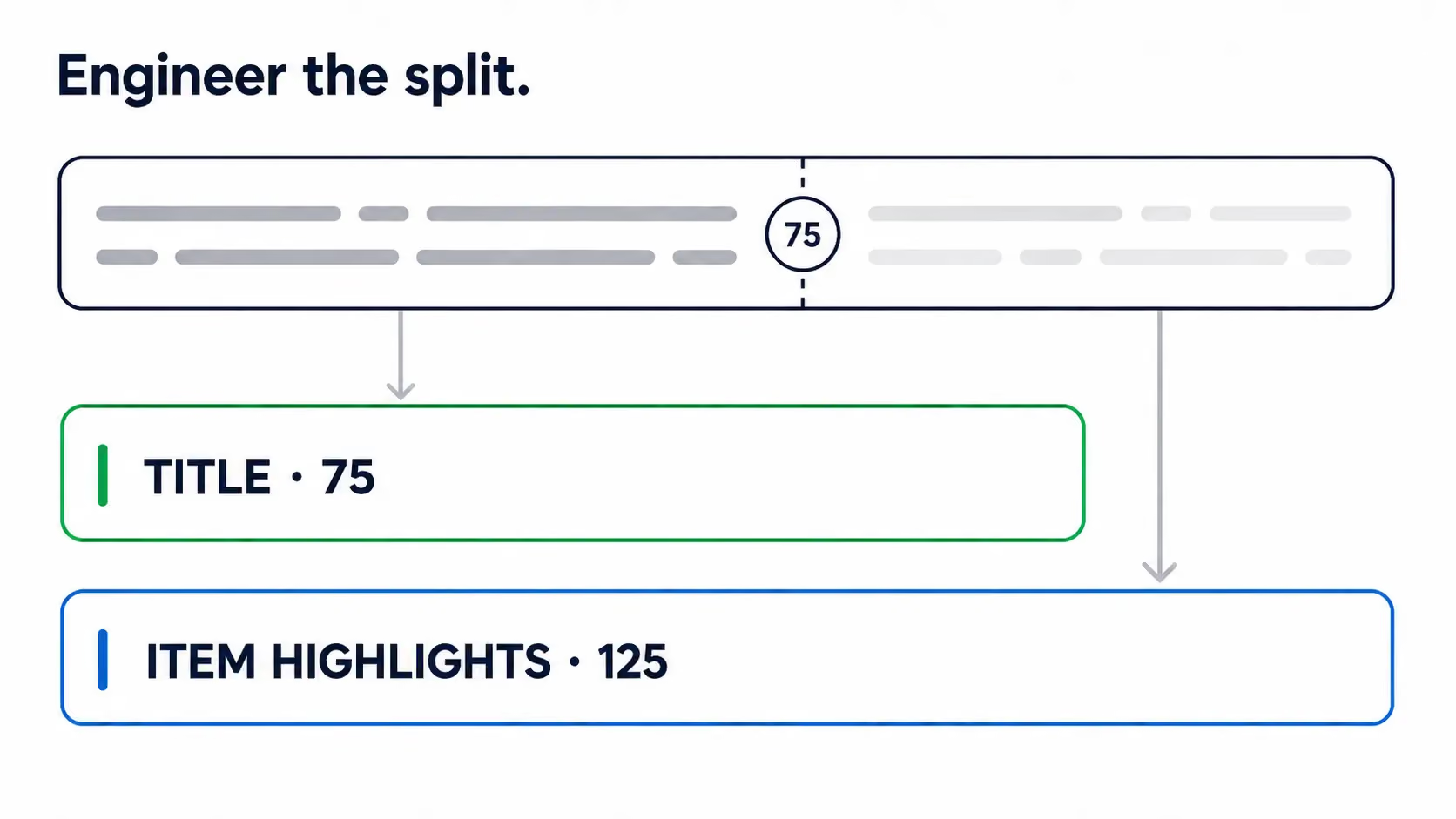
After July 27, your title stops being a marketing line and becomes structured data - a short identity field, with a second 125-character field standing next to it. You can engineer the 75/125 split yourself, or Amazon's AI will do it for you, and the two outcomes are very different. The seller who moves first keeps the keyword equity an automated rewrite would otherwise spend. Everyone else finds out, gradually, what the algorithm thought their listing was about. So before you decide what to do, it helps to know exactly what changed.
What is Amazon's new 75-character title rule?
Starting July 27, 2026, Amazon requires product titles in all categories except media to fit inside 75 characters, spaces included - and the rule applies across Seller Central marketplaces, the United States among them. Media is the one carve-out the announcement names, drawn narrowly: books, music, and video, nothing else.
The announcement is precise about the number and quiet about the edges. It names the media exception and stops there, so if your category carried a longer title cap before, the post doesn't say how that older limit interacts with the new 75. Sellers asked; Amazon hasn't answered in the thread. Treat 75 as the line until told otherwise, and don't assume your old ceiling still stands.
Those 75 characters tell only half the story. The same announcement introduces a second field, Item Highlights, with 125 characters of its own for materials and recommended use cases. Amazon's exact words for it matter: the content is searchable, and it shows below your title in search results and on the product detail page. That single sentence carries most of the weight of this whole change. Read it as a new discovery surface.
Item Highlights is brand new, and it is not your bullet points. The forum spent its first day untangling the two, because a fresh field with a 125-character budget that appears in search results behaves nothing like the five bullets buried down the detail page. Get that distinction straight before you start moving text around. The rules exist today; the deadline is when Amazon starts acting on them.
After July 27, the rewrite happens with or without you
July 27 is the day Amazon starts enforcing what the announcement already says. After the deadline, any title still over 75 characters gets "updated to the AI recommendation gradually," in Amazon's own phrasing. Your listing stays active the entire time, and you can change your titles and Item Highlights whenever you want. Nothing about the deadline is a kill switch. It's simply the moment a default starts executing.
There is a brake, and it has a name. When Amazon proposes changes, brand owners get 14 days to review, modify, and approve the AI's recommendations inside a panel called Review Listings Changes. Nothing goes live until they do. That window is the difference between watching the rewrite and steering it. But it is built for brand owners. The announcement says nothing about whether sellers without Brand Registry get the same preview, so don't count on one you haven't confirmed.
None of this is a bluff, and the reason sits on the record. In January 2025, Amazon ran the same play: a new title policy, correction suggestions sent to brand owners, a 14-day window, then automatic updates for anyone who didn't act, with listings staying active throughout. The sequence is identical - suggestion, window, auto-update - so the July 27 mandate is that template reused. That precedent is the strongest evidence that the AI rewrite will actually run.
There is a second cost here, and it has nothing to do with keywords. Amazon's AI optimizes the rewrite for length and basic relevance. It does not run your title through a compliance check first. Amazon also judges the text on the listing rather than who typed it, so whatever the rewrite produces becomes your liability. Sellers have already reported these automated rewrites producing gibberish: the wrong year, the wrong dimensions, unrelated keywords pulled in from nowhere. A rewrite that leaves behind a restricted phrase or a stray subjective claim is the same failure with a worse ending, because a non-compliant title can be suppressed before you even notice it changed. That is the real reason to review the AI's version instead of trusting it.
The sellers in the thread have lived through the template, and it shows. "This is going to go so smoothly, I'm sure" one wrote, ninety upvotes deep in sarcasm. "Amazon will NOT bungle this" - the distrust is more than earned. The mechanics hold regardless: leave a title over the line, and Amazon's AI decides what gets cut. That's the default. The question is whether the AI's cut is the one your listing can afford - and that's the part worth slowing down for.
The mobile explanation is true, but incomplete
Amazon gives a reason for the cap, and on its face it's a fair one. Product titles are among the first things a shopper sees, the announcement says, and on mobile every character counts. Seventy-five characters keeps the title fully visible on a phone. That holds, and it's older than the mandate. Back in 2019, Blue Wheel's mobile guidance already noted that Amazon's mobile search results showed only the first 75 characters or so of a title. The cap formalizes a display reality that has been sitting there for seven years.
The reason holds, but it doesn't cover everything. A clean 75-character identity line plus a separate searchable attribute field reads easily on a phone and parses just as easily for a machine: identity sits in one place, attributes in another, each labeled, with no word salad to untangle. That shape happens to be exactly what Amazon's newer AI readers want from a listing.
Two of those readers deserve names. COSMO is Amazon's knowledge graph, and it reads listings as relationships between products, uses, and buyers rather than as keyword strings. To rank a product, it needs to know what that product is and what it's for, and a structured field hands it that directly. Alexa for Shopping, Amazon's AI shopping surface launched May 13, is the engine Rufus ran before, now answering shoppers directly, and it pulls from the same listing to write those answers. More than 300 million shoppers have already used Amazon's conversational surfaces. They don't scroll a results page. They ask, and something reads your listing to reply.
The mandate also fits a pattern Amazon has been building toward for a while. Its AI listing generator already runs at scale, across more than 900,000 sellers, with a 90% acceptance rate on what it suggests. And per Business Insider's reporting on leaked internal documents, an initiative called Project Starfish has been scraping roughly 200,000 brand websites to enrich and rewrite listings. The projected payoff runs to billions in added sales. Catalog-wide AI rewriting was the direction Amazon was already moving well before June 10.
Put the pieces together, and the cap reads less like a formatting tweak and more like Amazon tidying its catalog into fields its own AI can trust. Structured fields reward whoever fills them on purpose. That is what Listing Engineering means in practice: structuring a listing's content deliberately for everything that reads it, the keyword engine and the AI engine alike. The sellers who treat the new field that way get read the way they intended.
What an unmanaged title cut can cost you
Being deliberate assumes you have room to be deliberate, and not every seller does. "This will not work under Toys & Games," one wrote in the thread. "You need brand, title, edition, rarity and set information in the title. There is no way to include this information in 75 characters." That points past formatting to the real problem: a category where five required facts don't fit the new budget. The objection is the clearest picture of what the cut actually costs.
The squeeze stings for a structural reason. The title carries more A9 weight than any other field, and A9 still decides your organic rank. The words in it have been doing real ranking work all along. Cut a title from the old 200-ish characters down to 75, and you drop keywords that may be holding positions you can't afford to lose. Which keywords, exactly? That is the whole question, and the AI default never asks it on your behalf.
Nobody can promise the displaced keywords will keep their power. The 125-character Item Highlights field is searchable, which genuinely helps. But Amazon hasn't documented how it weights that field for ranking, so anyone who tells you the 125 characters fully replace what the title lost is guessing. The keywords move to a new room. Whether that room carries the same weight is unknown, and pretending otherwise is how sellers get burned.
That uncertainty is exactly where accepting the default gets expensive. Amazon's AI optimizes the rewrite for length and catalog consistency. It aims for a title that fits and reads cleanly. Which two keywords carry your rank, or which phrase wins your click, never enters that math. And because the change rolls out gradually, you may not even watch it happen. Some of what gets cut was already invisible: mobile results have shown only the first 75 characters or so for years, so a chunk of any 200-character title stopped being seen long ago. The real trouble is telling the dead weight from the words actually holding rank - and you can't manage what you haven't measured.
Run Your AI Readiness Score - see what Amazon's COSMO and Alexa for Shopping engines can actually parse on your listing today, so you know what's holding up before you cut a single word. Run your free Score →
We analyze only your public listing data, charge you nothing, ask for no credit card, and never send spam.
How to engineer a 75-character title
Start with the listings you just flagged, the ones carrying rank past character 75. Treat each title as an identity decision rather than a keyword shelf. Seventy-five characters answers two questions for a shopper: what is this, and why this one. That means your brand, your core product noun, and the single differentiator that earns the click. Everything else becomes a candidate for Item Highlights or your bullets.
The easy characters come back fast. Amazon's own trimming guidance points the way: use numerals instead of spelled-out numbers, abbreviate units of measurement, and drop the filler words that never earned their space. Most titles surrender ten or fifteen characters this way without losing a single real keyword. Do that pass first, because it tells you how much genuine cutting is actually left to do.
The hard pass is choosing between keywords that both feel essential. This is where the listing's own search data beats instinct, because the keyword you're attached to is not always the one bringing buyers in. Look at which terms actually convert, keep those, and let the sentimental ones move to the 125-character field. Being right about the data beats being loud in the title.
Some categories simply won't fold into 75 characters, and any workable method has to admit it. One seller in art and collectibles made the point well: an artist's first and last name alone can run past fifty characters, before you've even named the work. When identity genuinely doesn't fit, pick the one disambiguator buyers actually search, accept the loss on the rest, and watch the review window to catch a bad automated cut. One more check before you decide what to keep: look at what your title shows at the mobile cutoff. Anything past roughly character 75 has been invisible to most of your shoppers for years, so the cut usually costs less than it feels like it will.
What should go in the 125 characters of Item Highlights?
The keywords you just pulled out of the title need somewhere to go, and the announcement built the room. Item Highlights gives you 125 characters, and the line that makes it matter is Amazon's own: the content is searchable and shows below your title in search results and on the product page. Searchable is the word to hold onto. This field still gets indexed, which makes it the natural home for the terms the 75-character cut displaced.
Lead with what Amazon asked for - materials and recommended use cases - then weave the displaced keywords into that phrasing naturally. Use-case and audience language does double duty here, because it's also what Amazon's AI surfaces reach for when they answer a shopper's question about a product. Write it the way you'd describe who the product is for and when they'd use it, and you'll land most of the keywords you care about without forcing any of them.
The temptation is to dump every cut keyword in and call it placement. Don't. Amazon's recommendation logic is explicit: keep key product information in the title, move additional details to Item Highlights. The system wants the two fields doing different jobs. A second word salad in the new field just recreates the mess the whole mandate exists to clean up, and a machine reader trips over it the same way it trips over a stuffed title.
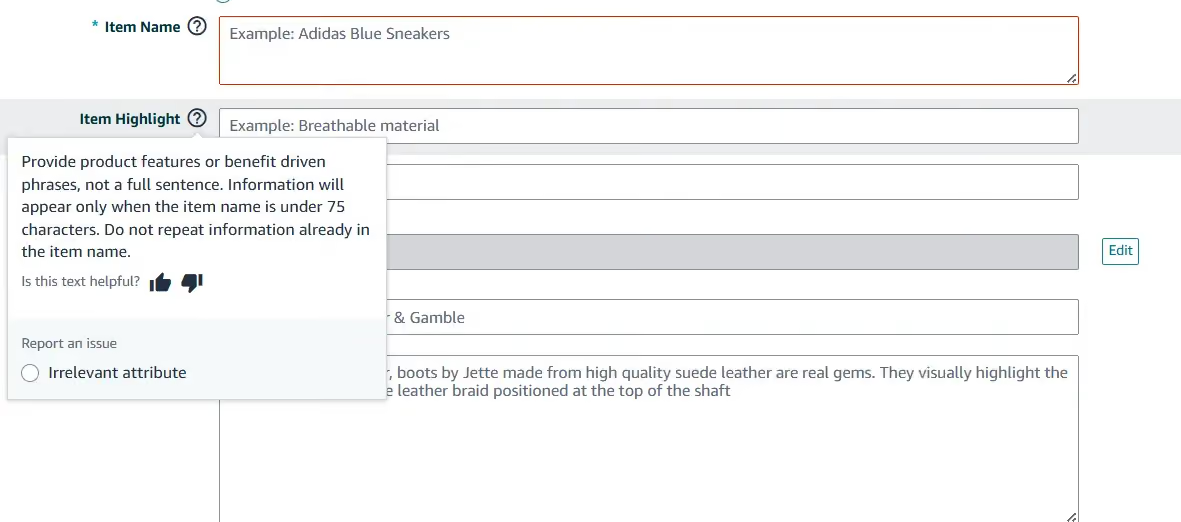
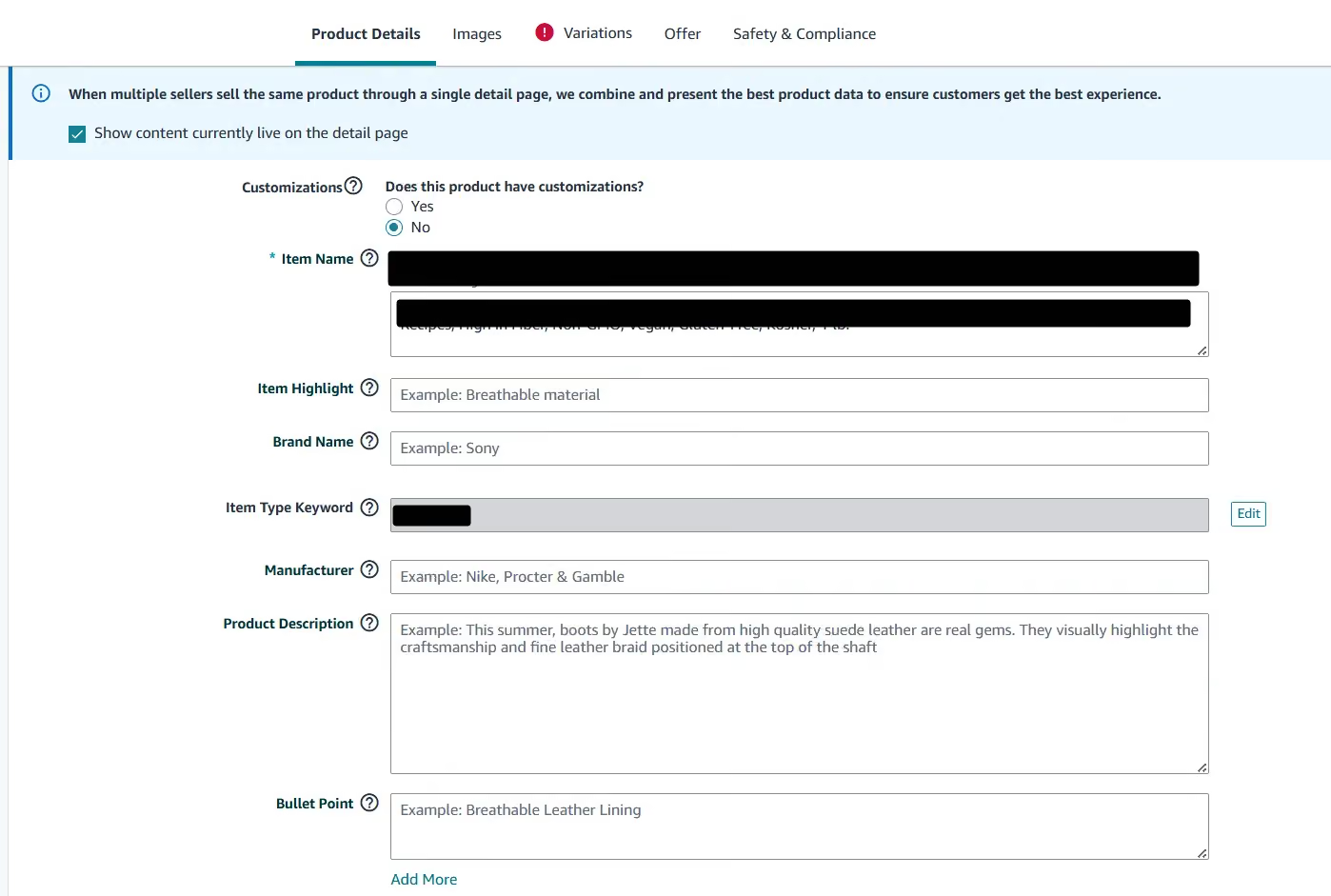
Amazon's own guidance for the field is specific, and it pays to follow it to the letter. The in-app help says to use product features or benefit-driven phrases rather than full sentences, and not to repeat anything already in the title. It also names a catch most coverage has missed: your Item Highlights appear only once the item name is under 75 characters. The field only pays out after you comply. Trim the title first, or the keywords you carefully placed here never show.
Amazon Seller Central help text for the Item Highlight field: use benefit-driven phrases, information appears only when the item name is under 75 characters, and do not repeat the title.
One more option for displaced keywords is hidden from shoppers entirely: your Backend Search Terms. If a load-bearing phrase can't earn a place in the 75-character title and you'd rather not lean on Item Highlights alone to carry it, put the exact phrase there. It keeps the term indexed without crowding your public title, and it's a sensible backstop while Amazon stays quiet on how heavily Item Highlights actually weighs for ranking.
One practical limit, observed as of writing: you can edit Item Highlights only on screen. A seller who tried to populate it through a flat-file upload got back the error "100476: This attribute 'Item Highlight' is currently unsupported," and Amazon hasn't confirmed bulk or API support either way in the thread. So plan the field listing by listing for now, and re-run that flat-file check yourself before you build a catalog-wide upload around it, because Amazon may switch support on without much warning.
Can you just use ChatGPT or Claude to do this?
For most sellers the first question is whether a free AI tool can handle the cut for you. The answer is yes for the mechanical part, and that covers part of the work. A general model like ChatGPT or Claude is good at exactly what the 75/125 split needs: trimming a title to a character budget, swapping spelled-out numbers for numerals, abbreviating units, and drafting an Item Highlights line from your materials and use cases. Give it the right instructions and you get a compliant draft in seconds.
Here is an example prompt that does it. Paste it into ChatGPT or Claude, fill in the brackets, and it returns a 75-character title, a 125-character Item Highlights line, the character counts, and a list of every keyword it dropped:
You are an Amazon listing specialist. Amazon now caps product titles at 75 characters (including spaces) in every category except media, effective July 27, 2026, plus a separate searchable "Item Highlights" field of 125 characters. Rewrite my listing into the two fields.
Current title: [PASTE]
Brand: [BRAND]
Core product (what it literally is): [e.g. stainless steel water bottle]
Top differentiators, most important first: [e.g. 32oz, insulated, leakproof]
Keywords that actually drive my sales (from your Brand Analytics or search-term report - if you don't know them, write "unknown"): [PASTE]
Category: [CATEGORY]
Rules:
- Title 75 characters or fewer. Lead with brand + core product noun + the single most important differentiator. Identity first, not a keyword list.
- Item Highlights 125 characters or fewer: materials and use cases, weaving in the important keywords that did not fit the title. Must read like a human wrote it - no keyword stuffing.
- Use numerals (32oz, not thirty-two ounce), abbreviate units, cut filler words (premium, perfect, high-quality).
- No claim language (best, #1, eco-friendly unless certified) - it risks suppression.
- Keep every word whole - never cut a word off mid-way to hit 75 characters.
- After rewriting, give the exact character counts AND list every keyword you dropped from my title, so I can judge whether any are too important to lose.
You do not have access to my live search-rank data, so you cannot know which keywords are holding my organic rank. Flag anything you are unsure about rather than guessing.
Read that last instruction again, because it carries the whole section. A general AI can format the split, but it is blind to the one input that decides whether your cut helps or hurts: which of your keywords are actually holding your rank. It cannot see your search-term report, your Brand Analytics data, or where each phrase ranks today. So when it drops a keyword to fit 75 characters, it is guessing which words you can spare. On the listings that bring most of your sales, a wrong guess costs you positions you had no reason to lose.
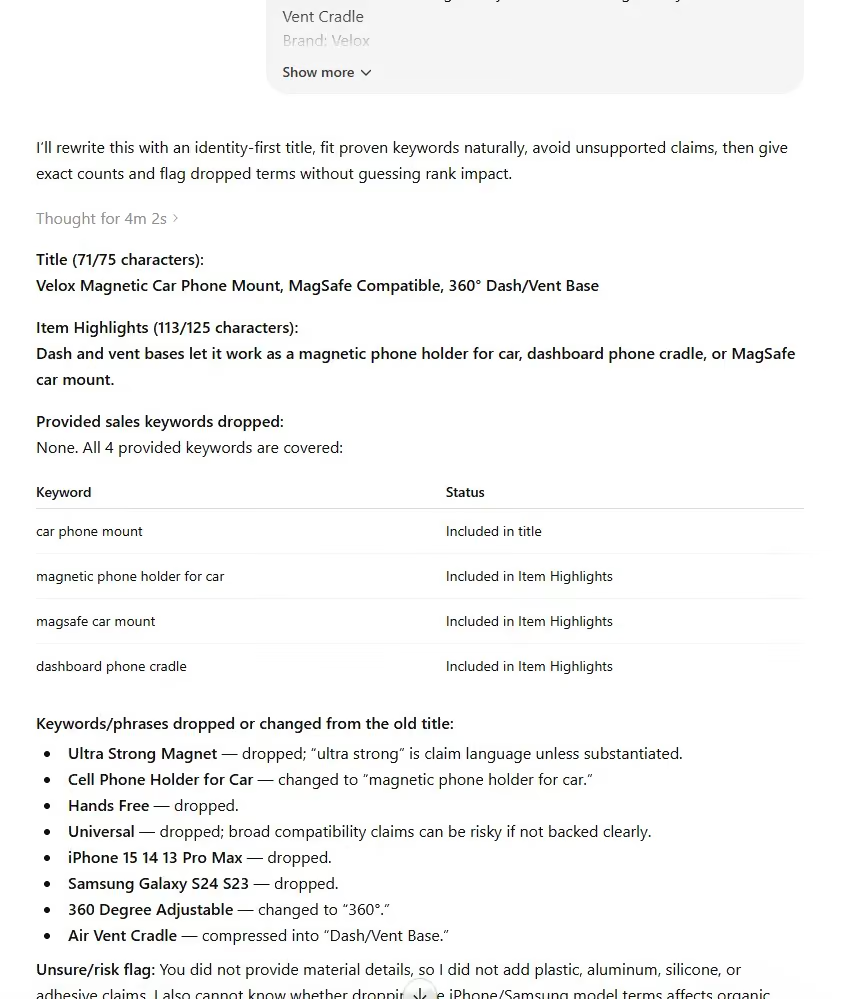
That is the line between a draft and a decision. Let the AI write the draft. Before you publish the cut on a listing that matters, check which of your keywords are load-bearing so you keep the words doing the ranking and trim the rest.
Run your catalog before July 27 - and measure what you changed
Fixing one title is a decision. Fixing a catalog is a project - and most readers are looking at dozens or hundreds of non-compliant titles with roughly six weeks to go. By now the pieces of the argument are all on the table: Amazon has split the title into two fields, a default rewrite runs on anything you leave alone, and the new structure rewards sellers who fill the 75 and the 125 deliberately. What none of that tells you is whether a rewritten listing is actually ready for the AI that now reads it.
So spend your manual effort where rank actually lives, and let the rest ride:
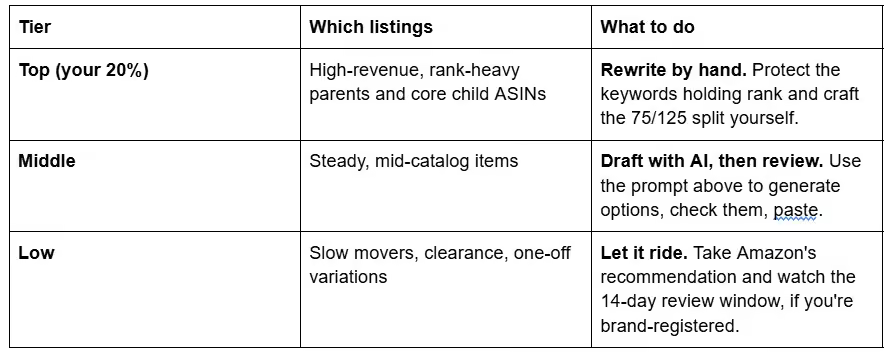
Start where the announcement starts. Open Manage All Inventory, edit a listing, and click View enhancements to see Amazon's recommended title and Item Highlights for it - the same three-step path the June 10 post walks you through. Use it to inventory what's over the line, then prioritize by the traffic a listing earns and by whether its rank lives in those characters past 75. Rewrite that priority pile by hand. Where a listing barely sells, letting the AI recommendation stand costs little. And if you're a brand owner, put the 14-day Review Listings Changes window on your calendar so no automated cut goes live unwatched.
A rewrite you can't measure is a rewrite you can't defend, which is where a before-and-after read earns its place. The AI Readiness Score is a free check of a live listing: paste an ASIN, and you get a 0-to-100 read on how well it answers what Amazon's AI discovery asks. The median across more than 5,000 live listings is 65 out of 100, with the COSMO half landing at 70 and the Alexa for Shopping half at 54. Score a listing before you cut and again after you rebuild it. Then you can tell whether the new 75/125 split actually improved what the machine reads or just satisfied the character count.
Which brings the whole thing back to the question the announcement raised on June 10: after July 27, every over-length title gets rewritten, and the only open part is who does it. Engineer the 75/125 split yourself, or Amazon's AI will, and only one of those keeps the keyword decisions, and the equity behind them, in your hands. The rewrite is coming either way. The mechanical fit - 75 here, 125 there - Amazon's own AI tool will handle for free. What it won't do is decide which of your keywords are worth keeping. That decision is yours, and it starts with knowing which words on your listing are actually earning their rank, because the ones quietly carrying your position are exactly the ones a blind cut is most likely to throw away.
Frequently asked questions
Which products are exempt from the 75-character limit?
Only media - books, music, and video. The announcement names that single exception and no other, and it doesn't spell out how the old per-category title caps interact with the new 75 - something Amazon hasn't clarified in the seller thread. Until it does, plan every non-media listing around the 75-character line.
Are Item Highlights the same as bullet points?
No. Item Highlights is a new, separate field with its own 125-character budget, meant for materials and use cases. Its content is searchable and appears in search results, not just on the detail page. The forum spent June 10 confusing the two, but they do different jobs and live in different places.
Will my Item Highlights show if my title is still over 75 characters?
No. Amazon's in-app help for the field is explicit: the content appears only when the item name is under 75 characters. So Item Highlights can't rescue a long title by holding the overflow. Until you trim to 75, the keywords you put there stay hidden. Trim first, and then the field works for you.
Can I change my title after Amazon's AI rewrites it?
Yes. The announcement is explicit: your listings stay active throughout, and you can change your titles and Item Highlights at any time. The AI rewrite is a default that runs if you do nothing, not a lock on your listing. If the automated version gets something wrong, you can edit it back.
If Amazon's AI rewrites my title and it breaks a rule, who is responsible?
You are. Amazon evaluates what appears on the listing, not who typed it, so a claim or policy violation introduced by the automated rewrite is still yours to fix. That is the strongest reason not to let the default run unwatched. Review the AI's version - inside the 14-day window if you are a brand owner, or through your change history if you are not - and correct anything that drifts before it costs you.
Does the brand name still have to come first in the title?
The update governs title length, not which elements belong in a title, so the brand-first best practice still stands - nothing in the announcement removes it. Fit brand, core product, and your single most important differentiator inside the 75 characters, and move the rest into Item Highlights.
Should I shorten all my titles now, before July 27?
Shorten selectively, not all at once. Until the deadline your longer titles are still working for you, so cutting everything early surrenders keyword coverage in the meantime. Rewrite the high-traffic, rank-carrying listings by hand before July 27, and let the lower-stakes ones ride until Amazon's rewrite reaches them.
Can I use ChatGPT or Claude to shorten my Amazon title to 75 characters?
Yes, for the mechanical part. A general AI handles the compression well: fitting 75 characters, switching to numerals, abbreviating units, and drafting the 125-character Item Highlights line. What it cannot do is see which of your keywords actually hold your search rank, because it has no access to your search-term or Brand Analytics data. So use it to produce the draft, then confirm which keywords are load-bearing before you publish the cut on a listing that matters.
Is there a bulk or API workflow for Item Highlights?
Not yet, as far as anyone can see. This was the thread's most-upvoted question, and the evidence so far is one error message: a seller's flat-file attempt returned "100476: This attribute 'Item Highlight' is currently unsupported." Amazon hasn't confirmed bulk or API support either way, so the field is on-screen-only for now. Re-run that flat-file test yourself before building any upload around it.


.avif)