


Since March 25, 2026, Amazon has been charging you for "prompt clicks." A prompt is a short question Amazon shows next to your ad - something like "will this fit a 27-inch monitor." When a shopper clicks that question, you pay for the click. Amazon records those clicks in a report called the Prompts report, inside your Ads Console.
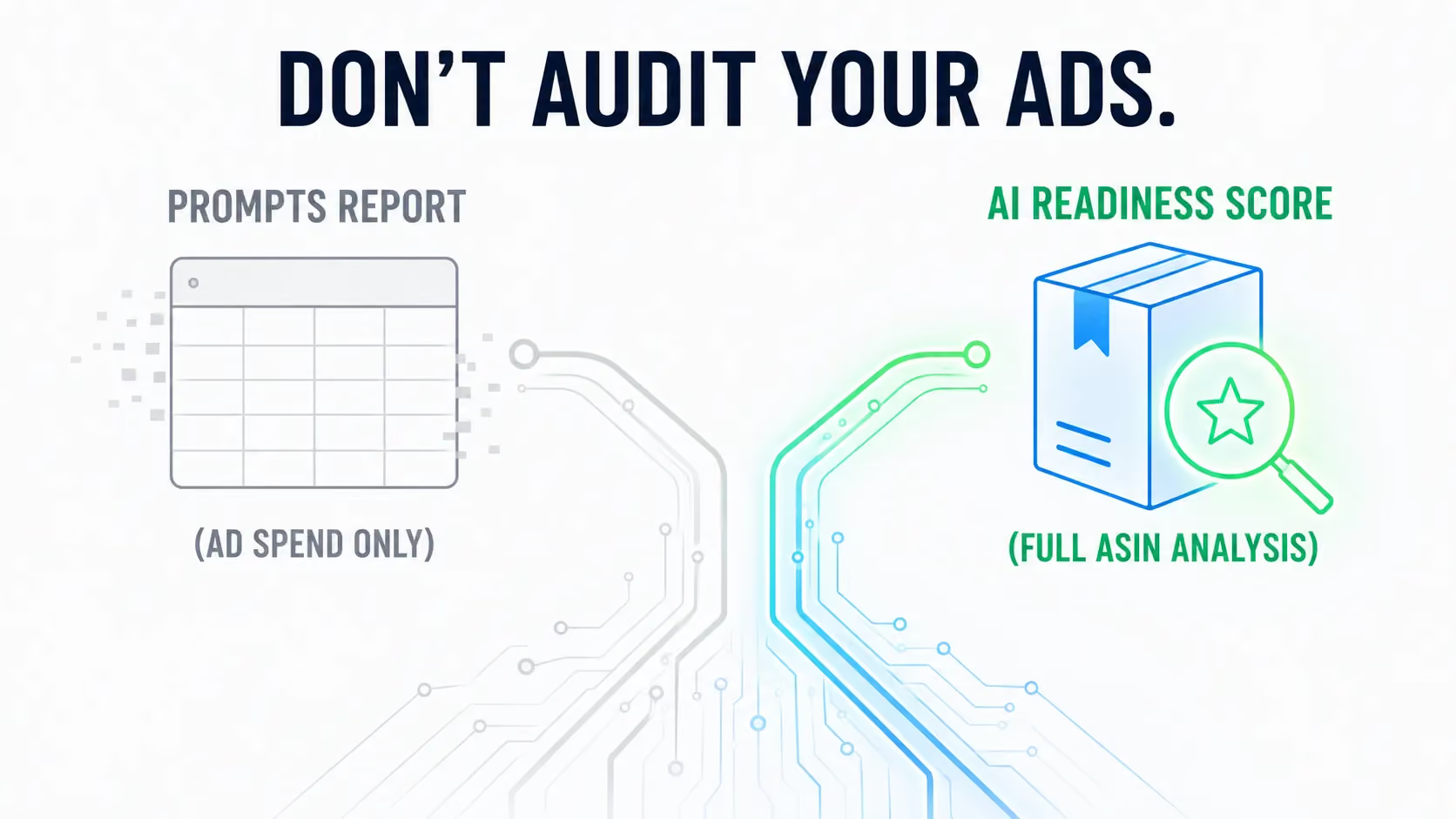
Have you ever opened that report hoping it would answer one question - is my listing ready for AI shopping? It can't, and the reason is simple. The report only records questions that appeared next to your ads and got clicked. It says nothing about the questions that never appeared, or the ones shoppers scrolled past. It measures your ad activity, not your listing's ability to answer. And that ability is what AI readiness actually is.
This guide covers what the report is, why yours might be empty, what the rows really mean, and how to test your listing without spending a dollar on ads.
What is Amazon's Prompts report?
The Prompts report is a report inside Amazon Ads. It lists every AI shopping prompt tied to your Sponsored Products and Sponsored Brands ads that a shopper has clicked. Next to each prompt, you see the usual ad numbers: impressions, clicks, spend, sales, and so on.
The prompt itself is a short question that Amazon writes and displays beside your ad. Amazon says prompts "can appear in shopping results and product detail pages on Amazon." When clicked, a prompt "may open a dialog in Rufus or respond to the customer directly on the page where the prompt appeared." That dialog now belongs to Alexa for Shopping, Amazon's AI shopping assistant, launched on May 13, 2026. Amazon's docs still say Rufus, and that still fits: Alexa for Shopping folded Rufus into Alexa+, so the same system that reads your listing and writes the answers now works under the newer name.
Here's the timeline. Amazon opened the beta at its unBoxed conference on November 11, 2025. It stayed free through March 24, 2026. On March 25, prompts went live for US advertisers - everyone running eligible campaigns except authors and publishers - and the clicks started costing money that same day.
You never opted in. Amazon's documentation says eligible campaigns "will be automatically enrolled in prompts." There's no setup and no separate prompt bid. Clicks bill through your normal cost-per-click bidding. So if you ran eligible campaigns in March, you've been paying for prompt clicks ever since - even if you've never opened the report.
Your control comes down to one action: pause. You can pause any prompt in the Ads Console or through the Ads API. You can't write one, edit one, or approve one before it runs.
To find the report, go to Reports, click Create report, set the category to Sponsored Products, and pick Prompts as the report type. You can also see the same rows inside each campaign: open Ad Group, then Ads, then the Prompts tab. It looks like every other ad report you know, including Sponsored Display. The difference is what one of its columns holds.
What's actually in the report?
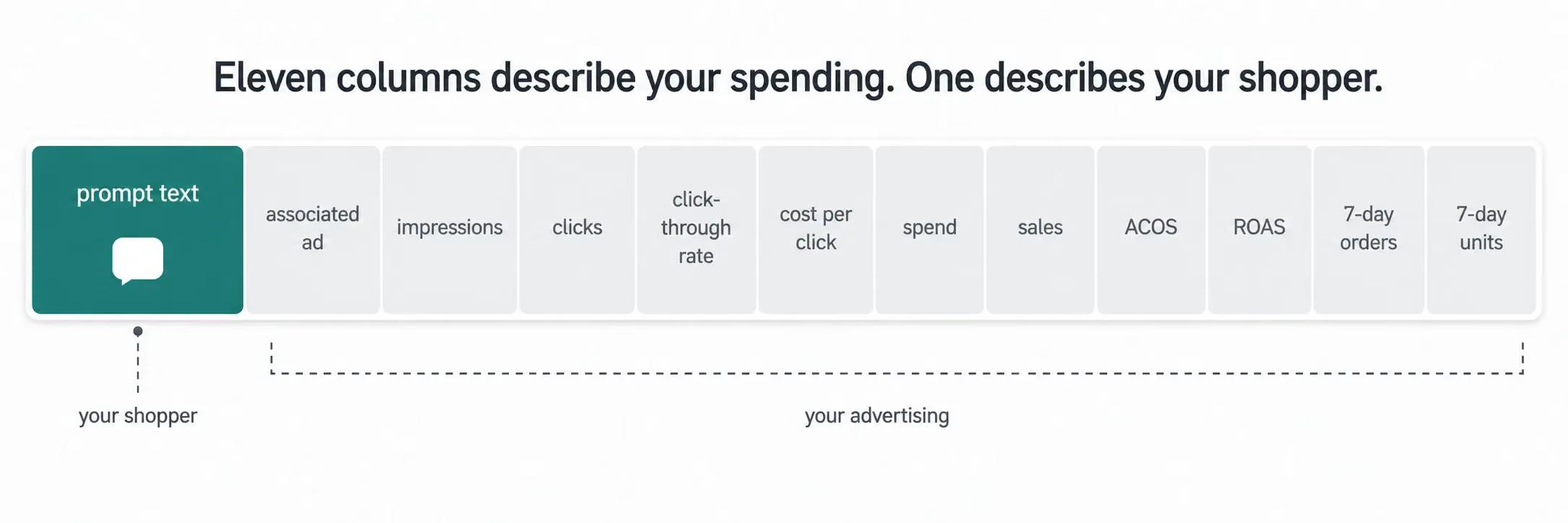
Amazon lists the report's twelve columns in one sentence: "prompt text, associated ad, impressions, clicks, click-through rate, cost per click, spend, sales, ACOS, ROAS, and 7-day orders and units."
Ten of those columns are ad metrics you already know from every other report. One names the ad the prompt ran with. Only one column - prompt text - is about your shopper. It holds the exact question a shopper clicked, in their own words.
That column is new and genuinely useful. No other Amazon surface shows you, ASIN by ASIN, which questions shoppers saw about your product. Brand Analytics shows market-wide search behavior, but it reads keyword history, not the AI's conversations about your product. So it's natural to treat prompt text as a sign of how ready your listing is.
Some things are missing from that list, though. There's no column for questions your product never appeared under. There's no column for prompts shoppers saw but didn't click. And because a prompt only earns a row once it's been clicked, every impression figure you can see belongs to a prompt that already worked. The report shows what happened, not what could have happened. That gap matters, and you feel it first when the report is empty.
Why is my Prompts report empty?
Amazon explains the rule in one line, describing the in-campaign Prompts tab: "all prompts are listed if they have received a click." The downloadable report follows the same logic. No click, no row. A prompt can appear next to your ad hundreds of times, get read, get ignored - and leave no trace in the report you're paying for.
Three things must happen, in order, before a row appears:
- Your campaign gets traffic.
- That traffic sees a prompt.
- A shopper clicks the prompt.
If your ad budget is small, your campaigns get little traffic - so the process stops at step one. Amazon may still be showing prompts next to your ads, but until a shopper clicks one, the report has nothing to record. The tab stays empty. Nothing is broken, and there's nothing to fix in your settings. The report is simply waiting for a click that hasn't happened yet.
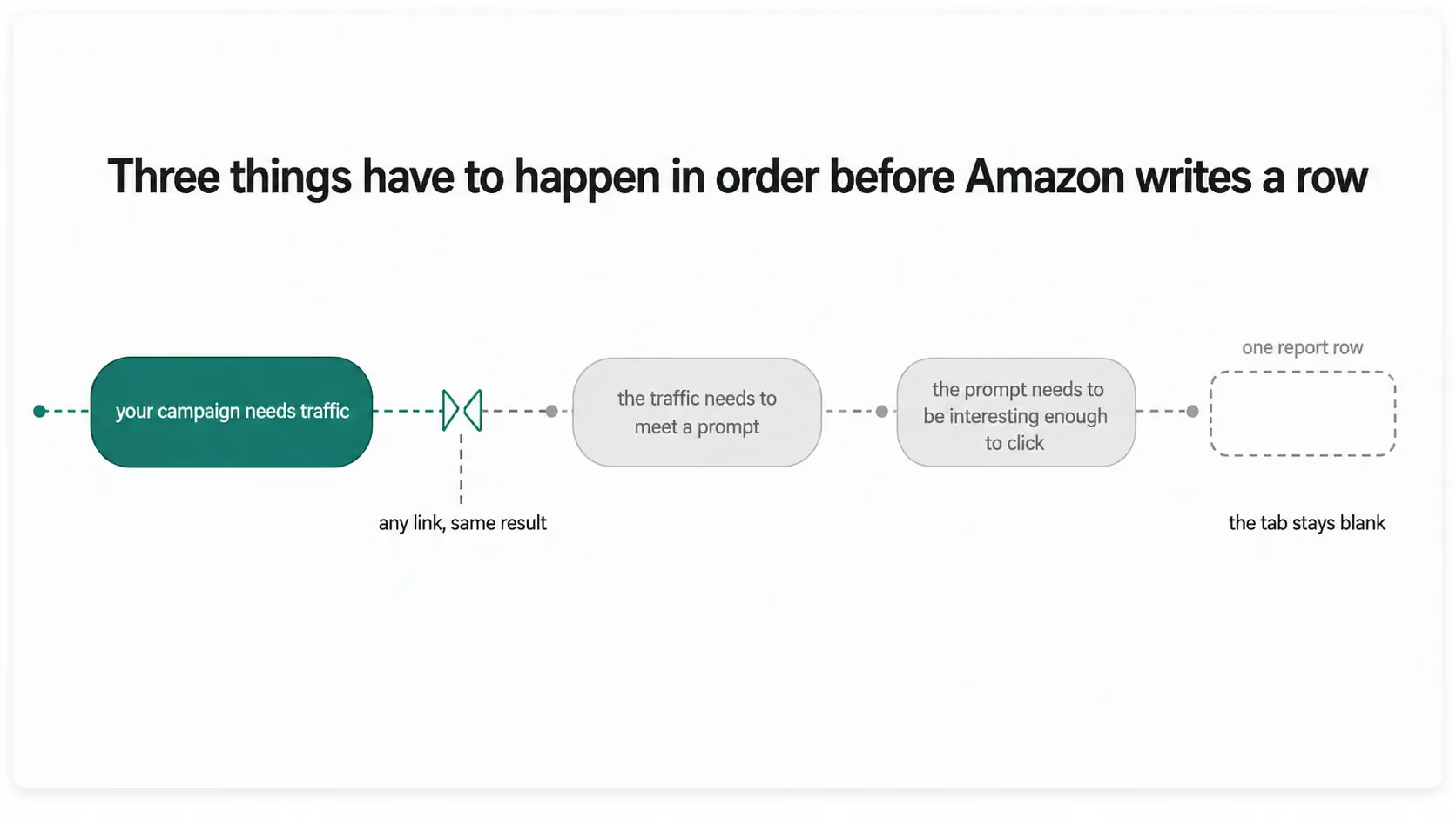
That's why an empty report tells you nothing about your listing. An account with no ad spend and a great listing looks exactly the same as an account with no ad spend and a weak listing. Both show an empty tab. The report records ad activity, and with no traffic there's no activity to record.
There's a second reason your report might be empty: where you sell. Amazon lists one market under availability, "North America: United States," with no expansion timeline anywhere on the page. As of this writing, that's still what it says. If you sell only on Amazon UK, you have no Prompts report, no prompt clicks on your invoice, and no way to test the feature at all.
Why a full report can't grade your listing either
If your report is full - say, forty rows of shopper questions - that looks like proof your listing is in good shape. It isn't, for two reasons.
The first reason is what the report leaves out. Every row required a prompt to appear and a shopper to click it. Questions that never appeared leave no trace. Questions that appeared but got no clicks leave no trace either. So the report can never show you what's missing - and what's missing is exactly what a readiness check needs to find.
The second reason is that you can't tell why any question appeared, or why another didn't. Amazon describes the inputs in one sentence: prompts "leverage Amazon's first-party signals from your detail pages, Brand Store, campaign data, and more to surface your product expertise." Your detail page and Brand Store are inputs you control. "Campaign data, and more" covers signals you can't see. And Amazon hasn't published how much weight each input carries. The questions may draw heavily on shopping behavior - what people in your category search for, buy, and ask. If they do, a question can appear even when your listing answers it badly, and a question your listing answers well may never appear at all.
Your listing still matters here, but in a narrower way than you might hope. Amazon can only highlight information that actually exists in your content, so a thin listing likely gives the system less to work with. "Likely" is the honest word: neither Amazon nor anyone else has published data showing that better question coverage earns a listing more prompts or more clicks. Treat that link as plausible, not proven.
So don't treat the row count as a score in either direction. A thin report doesn't prove your listing is weak - a small budget alone can produce it. A full report doesn't prove your listing is strong - it hides everything that didn't surface. What the rows give you is a sample of real shopper questions, and each one can be tested against your listing directly.
What the questions really test
A row in that column might read "is this safe on a gas stove." Whether your listing can answer that is a fact about your listing today. It doesn't depend on ads, clicks, or budgets. The click does just one thing: it puts the question in your report. Whether the question can be answered depends on something else entirely - what your listing says.
Two Amazon systems are the best-documented candidates for the answering. COSMO, Amazon's knowledge graph, understands products as a set of relationships, not just as keywords. It works with 15 defined relationship types - what the product is used for, what it can do, who it's for, where and when it's used, and so on. Amazon has published COSMO's deployment in search; its exact role behind prompts is Amazon's to confirm, but a graph built to judge whether a product fits an intent nobody has typed yet is precisely the machinery this feature needs. Then the engine behind Alexa for Shopping writes the actual answer, using the available information from your listing.
You can measure this without any ad traffic. ZonGuru's readiness read splits a listing along the same line:
- COSMO Semantic Mapping - can Amazon's graph read the relationships in your listing?
- Alexa for Shopping Q&A Coverage - does your listing answer the questions shoppers actually ask?
Across more than 5,000 live listings scored so far, the median score is about 64 out of 100 (measured on ZonGuru's own baseline as of July 2026). The semantic half sits near 69. The question-answering half sits near 54. If your listing is typical, its weak half is the one that answers questions.
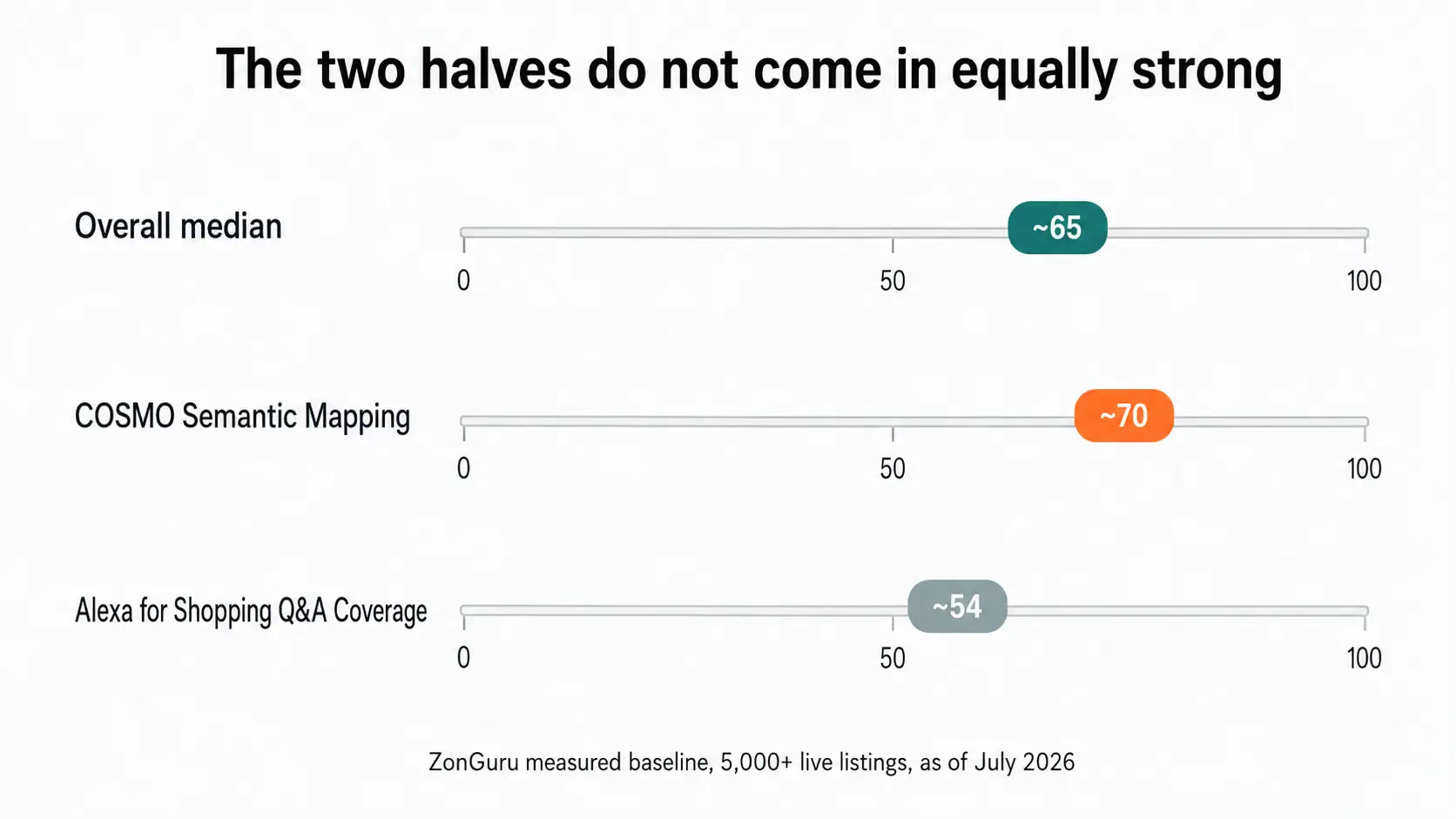
Those numbers are worth holding next to the Prompts report. The report's one useful column is made of shopper questions, and answering shopper questions is the half where listings score lowest. The Score can't predict which prompts Amazon will show - nobody outside Amazon can. What it can tell you is the thing the report can't: whether your listing could answer those questions if they came.
And that weakness is expensive. On Amazon's Q3 2025 earnings call, CEO Andy Jassy reported that shoppers who used Rufus during a shopping trip were about 60% more likely to buy than shoppers who didn't. That same engine now answers as Alexa for Shopping. And the one engagement number Amazon has published for prompts points the same way: on the Q1 2026 earnings call, Jassy said nearly one in five shoppers who click a brand's prompt keep the conversation about that brand going with the assistant. A prompt click isn't the end of the exchange - it's the start of a conversation your listing has to carry. The shoppers most likely to buy are the ones asking questions, and answering questions is where the typical listing scores worst.
How do you check your question coverage without buying clicks?
Read the listing itself. That's the one method no ad budget can block. The report needs spend and clicks, and it only returns questions that already appeared. A direct read needs one thing: your ASIN.
The manual way works. Open Alexa for Shopping, ask the questions your buyers would ask, and note where the answers about your product get vague. But it takes an afternoon per ASIN, and it's hard to repeat next month to see if anything improved.
The faster way is ZonGuru's AI Readiness Score. Paste an ASIN and you get a free 0-to-100 score of how well that listing answers what Amazon's AI asks, split into the two halves above. You can see where your listing stands in a couple of minutes, and the guide to running and reading a Score explains what each half of the result means.
Start with the ASIN you most want a straight answer about. If your Prompts report is thin, the report itself can't tell you why - so check the question-answering half of the Score first; chances are it's where your listing scores lowest. Find the questions your listing can't answer. Fix those before you touch a bid.
FAQ
Can I turn Amazon's prompts off?
You can pause any prompt at any time, in the Ads Console or through the Ads API - and pausing is the only control you have. Amazon's documentation describes no way to write, edit, or pre-approve a prompt. So when a prompt reads badly, pause it, then fix what produced it.
Am I paying for prompt clicks on a UK account?
No, because there are no prompts there to click. Amazon lists availability as "North America: United States," checked on July 29, 2026, with no expansion timeline published. If your brand runs both marketplaces, the US account is enrolled and the UK account is not. Any prompt line on your invoice belongs to the US side.
Does pausing a prompt change what my listing can answer?
No. Pausing removes an ad placement, nothing more. Your listing keeps whatever question coverage it had, so shoppers still ask the question and still get an answer written from whatever your listing says. Pausing is a spend decision. Fixing coverage is a listing decision.
Can I use the Prompts report as a keyword source?
You can mine it, as long as you know what you're mining. The column holds only phrasing that already appeared and already earned a click. It leaves out every question that never surfaced against your product. It's an honest record of what worked - and a map of demand with a hole exactly where you want detail.
What to do before your next billing cycle
Your next bill will include prompt clicks, just like every cycle since March 25. When you open the report, read it for what it really records: questions that appeared, got clicked, and led to sales. Don't read the row count as a grade - the count depends on your budget, your shoppers' clicks, and inputs Amazon doesn't disclose. None of the twelve columns can tell you if your listing is ready. Eleven describe your ads. The twelfth holds real shopper questions, but only the ones that appeared and got clicked. And Amazon's own numbers say those questions are the beginning, not the end: nearly one in five shoppers who click a prompt keep talking to the assistant about that brand. Every one of those conversations is answered from your listing.
The fix happens on the listing, not in the report. Make your listing answer buyer questions before an ad surface asks them. That's Listing Engineering: structuring your listing's content, on purpose, for every engine that reads it.
Run Your AI Readiness Score on the ASIN you most want a straight answer about. It's free, takes under two minutes, and shows you exactly where your listing stands. We analyze only your public listing data, charge you nothing, ask for no credit card, and never send spam.


.avif)