You're a few months into selling on Amazon, or a few weeks from your first launch, and you're trying to figure out how more experienced sellers built their stack without paying for everything. You typed "free amazon seller tools" into Google because the answer is supposed to be free, and most of what you've read so far has been a research tool that pivots to its paid plan inside the first 200 words.
The question you're actually asking is simpler: is there a free tool for every job an Amazon seller has, and which ones do which jobs? The honest answer is almost. There's a free version of nearly every tool you'd think to look for, and most of them are good enough to run a real Amazon brand on. The 22 below are sorted by what each one actually does.
There's one job, though - the one job free tools don't cover. And that one job is what decides whether your listing gets discovered on Amazon today, which makes it worth keeping in mind as you walk the rest of the list.
Why this list looks different in 2026
Look at any "best free Amazon seller tools" article on the SERP today, and open three of them - they all list the same stack of research tool, keyword tool, calculator, and price tracker, with maybe a Chrome extension or two thrown in. The cut hasn't really changed since 2018.
That stack still works, because A9 (Amazon's classic ranking algorithm) still drives organic position whenever a shopper types a keyword into the search bar. Keyword tools still surface ranking targets, price trackers still chart history, and sales estimators still project competitor velocity. None of that has gone away.
What has changed is what "readable to Amazon" actually means.
In 2024 Amazon shipped COSMO, an AI knowledge graph that maps how products relate to one another. The graph holds 6.3 million nodes and 29 million knowledge edges across 18 major product categories, and it runs underneath Amazon's search and recommendation surfaces - deciding which products show up for what kind of buyer intent, even when the keyword match is loose.
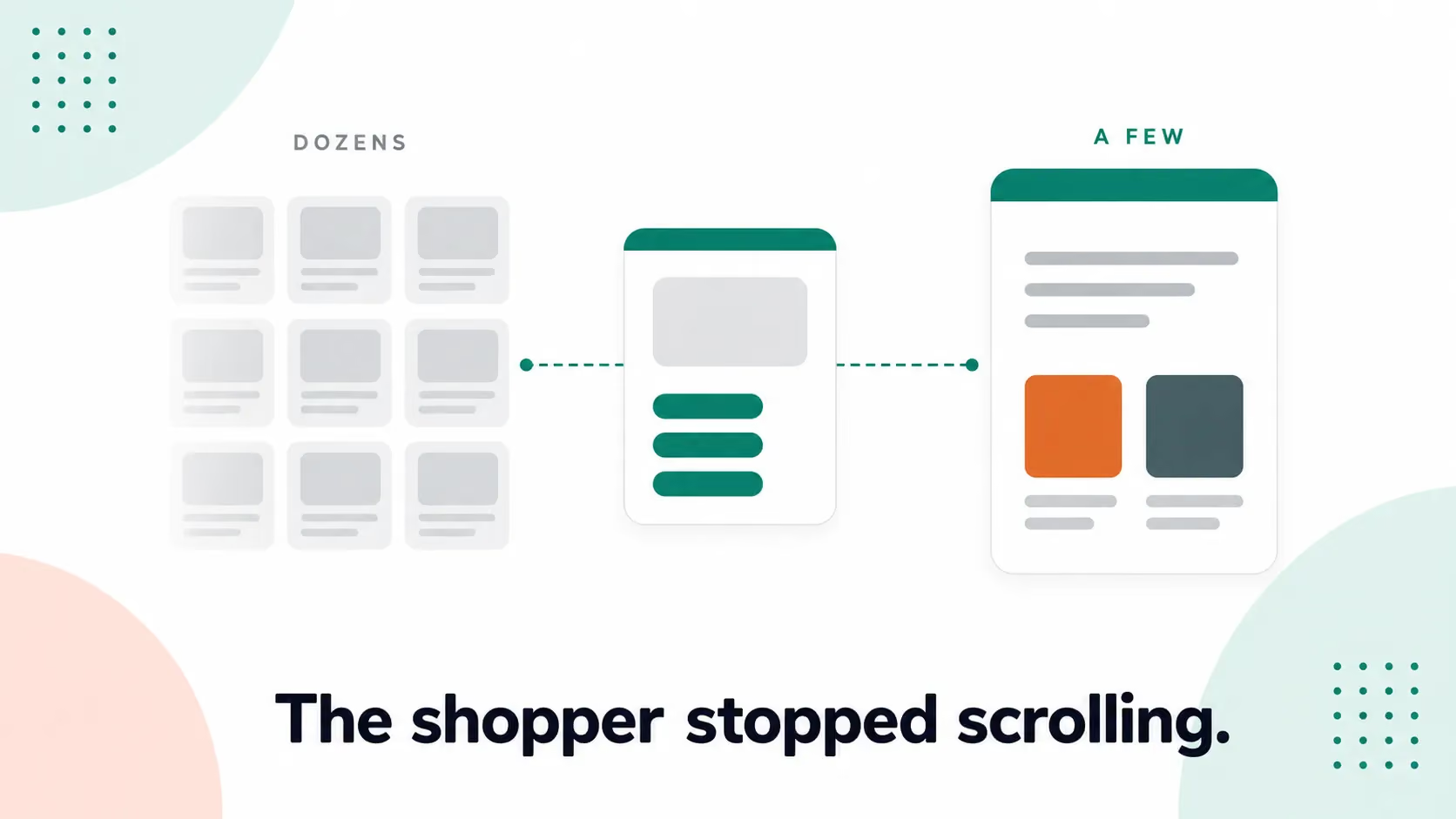
Then Amazon shipped Rufus, an AI shopping assistant that asks shoppers questions and answers theirs in plain language. On its Q4 2025 earnings call, Amazon reported that more than 300 million shoppers had used Rufus during the year. Buyers ask Rufus things like "is this safe for kids" or "will this fit my car," and Rufus reads the listing and answers in conversation.
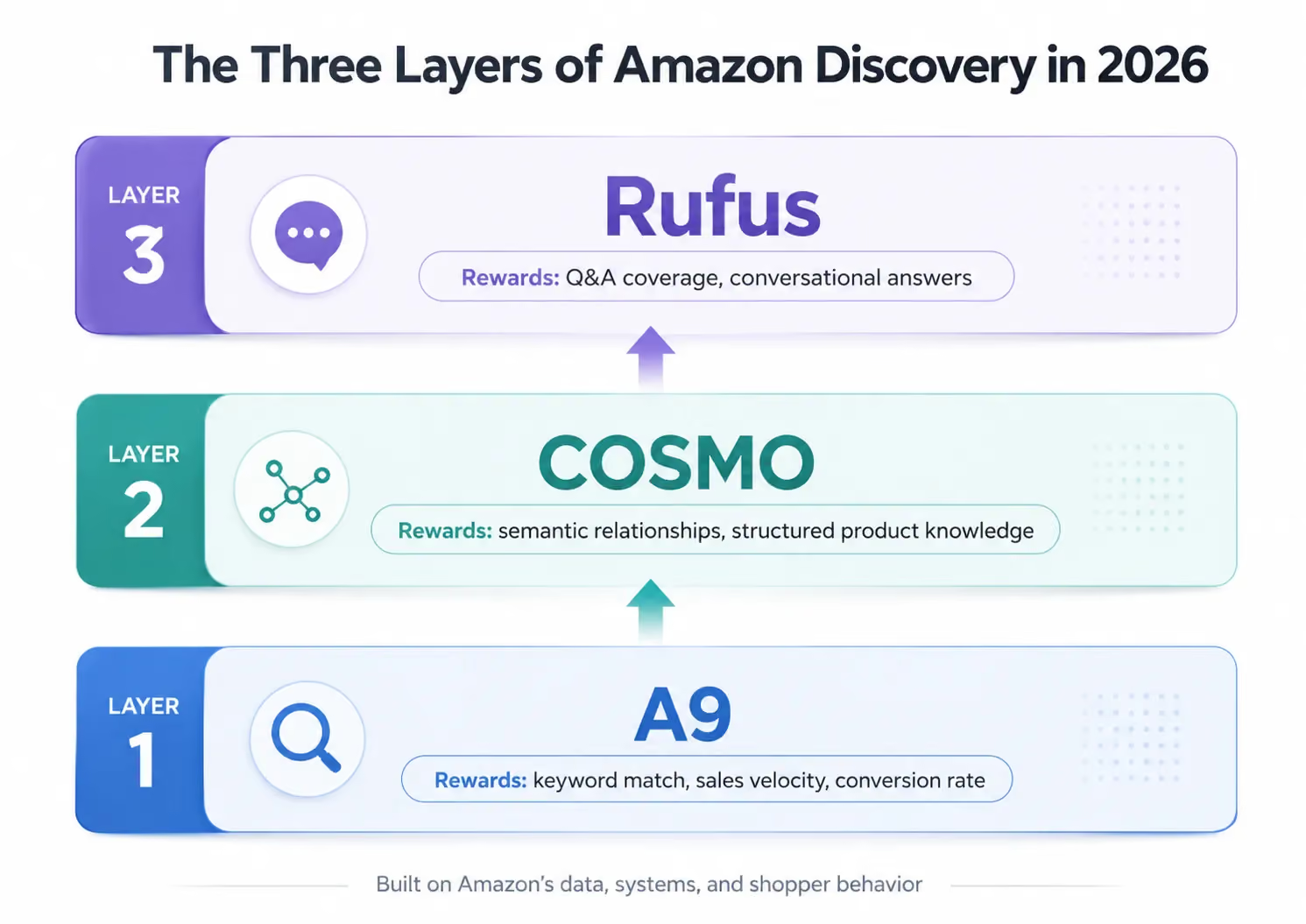
A9 still ranks listings, but COSMO and Rufus now decide what gets discovered, which means both layers matter and each one rewards different things.
A9 rewards keyword match, sales speed, and conversion rate, and the whole 2018 free-tools playbook is built for it. COSMO rewards structured product knowledge: your listing has to map cleanly to the relationships in the graph. Rufus rewards Q&A coverage: your listing has to anticipate the questions shoppers will type into the chat. Most listings score fine on the first layer and well below average on the second.
That's the gap the rest of this list is going to walk you around. Twenty-one of these tools work the A9 layer well, and some of them work it brilliantly, but none of them measure the second layer. The first one does.
Tool #1: The AI Readiness Score (and why it's first)
Most of the 5,000+ sellers who ran the AI Readiness Score arrived expecting to land in Strong, because they were testing their listings every quarter on Helium 10, their organic rank held steady, and their keyword density was dialed in. The dashboards looked fine.
Then they saw the score, which usually came back Adequate, with one sub-score that almost always pulled the average down.
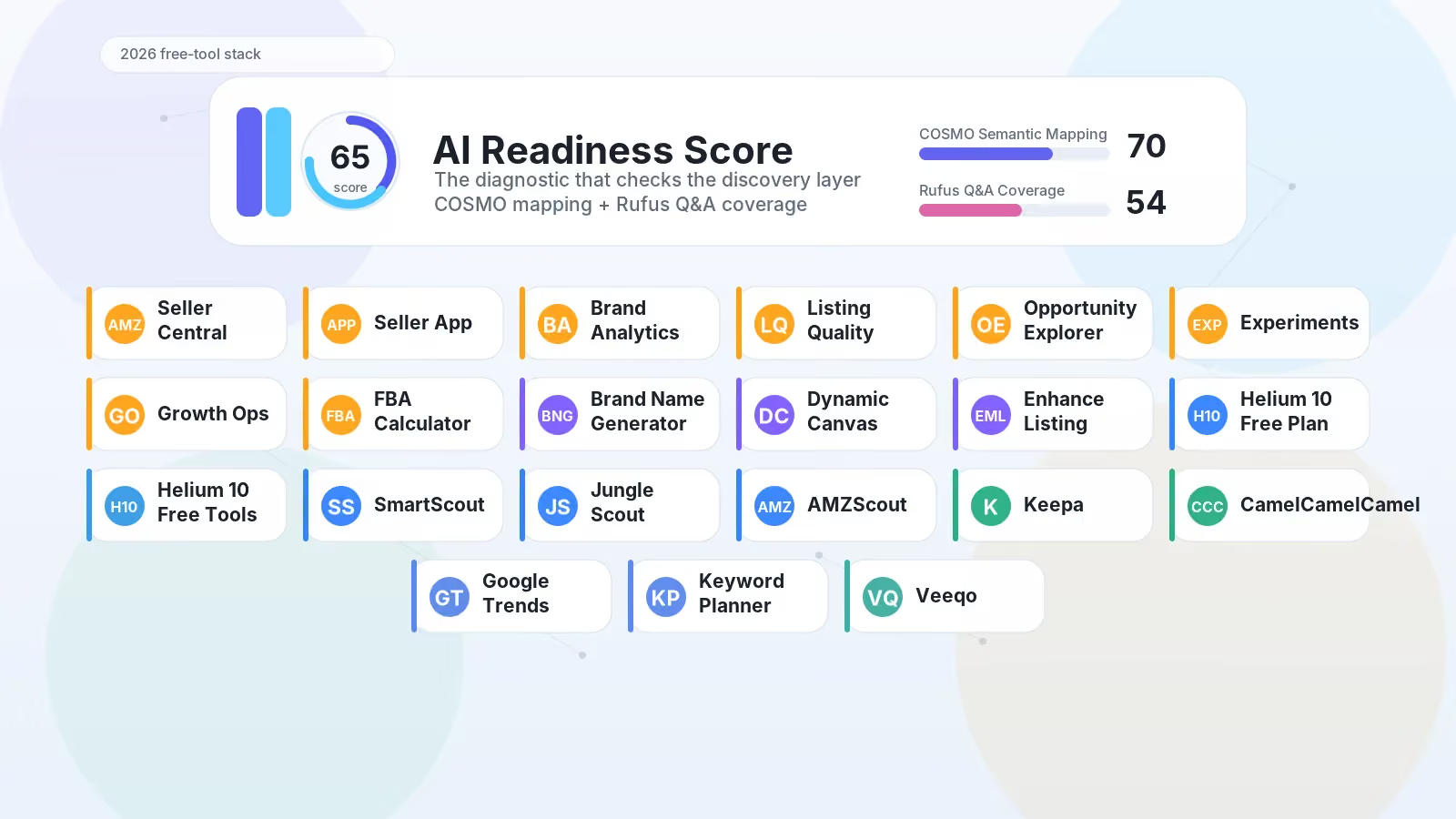
That number was Rufus Q&A Coverage. Listings scored a clean 70 median on COSMO Semantic Mapping (the part of the score that measures how well your listing maps to Amazon's knowledge graph), and they scored 54 median on Rufus Q&A Coverage (the part that measures whether your listing answers the questions a shopper will ask Rufus before they buy).
The gap had nothing to do with bad copy, because the keyword work was usually solid. What the listings didn't have was structured answers to the questions buyers ask in chat - fit, compatibility, materials, use cases, edge cases - the kind of questions a shopper would once type into a search bar in five words and now ask Rufus in full sentences. The listings simply hadn't been built for that.
The AI Readiness Score is the free diagnostic that surfaces this gap, and it runs ASIN-only: paste in a product link and the tool delivers a score with no payment, no credit card, and no demo gate in the way. The output is a 0-to-100 score split across two dimensions - COSMO Semantic Mapping and Rufus Q&A Coverage - and each dimension comes back with the specific gaps the tool found in your live listing copy.
The published median across more than 5,000 runs is 65 out of 100, and the lopsided 70/54 sub-score split is the typical shape - which makes Q&A the binding gap for most listings rather than Semantic Mapping.
Why does any of this matter for a free-tools listicle? Because every other tool on this list, and every other listicle on the SERP, assumes you already know whether your listing is readable to the algorithm. Keyword tools find what to rank for, sales estimators show what competitors are moving, and price-history tools show what prices did, but none of them tell you whether your listing speaks the language of COSMO or answers the questions Rufus generates. They can't, because they were built for a different layer.
A second proof point lives outside ZonGuru. On April 30, 2026, Apify shipped its own clone of the diagnostic, the Amazon Listing AI Score: Rufus Readiness Analyzer, which runs API-only with a free tier and pay-per-call pricing after. The clone matters less than what its existence signals: the diagnostic category is forming. The legacy A9-era platforms have nothing in this category at all, and the keyword-era platforms have shipped no measurement instrument for AI readiness yet.
Here's what to do with the score: run the AI Readiness Score on your top three listings - your highest revenue, your most-trafficked, and your newest - and look at the split that comes back. The Semantic number tells you whether COSMO can place your product in its graph, while the Q&A number tells you whether Rufus can answer a buyer's question from your listing copy.
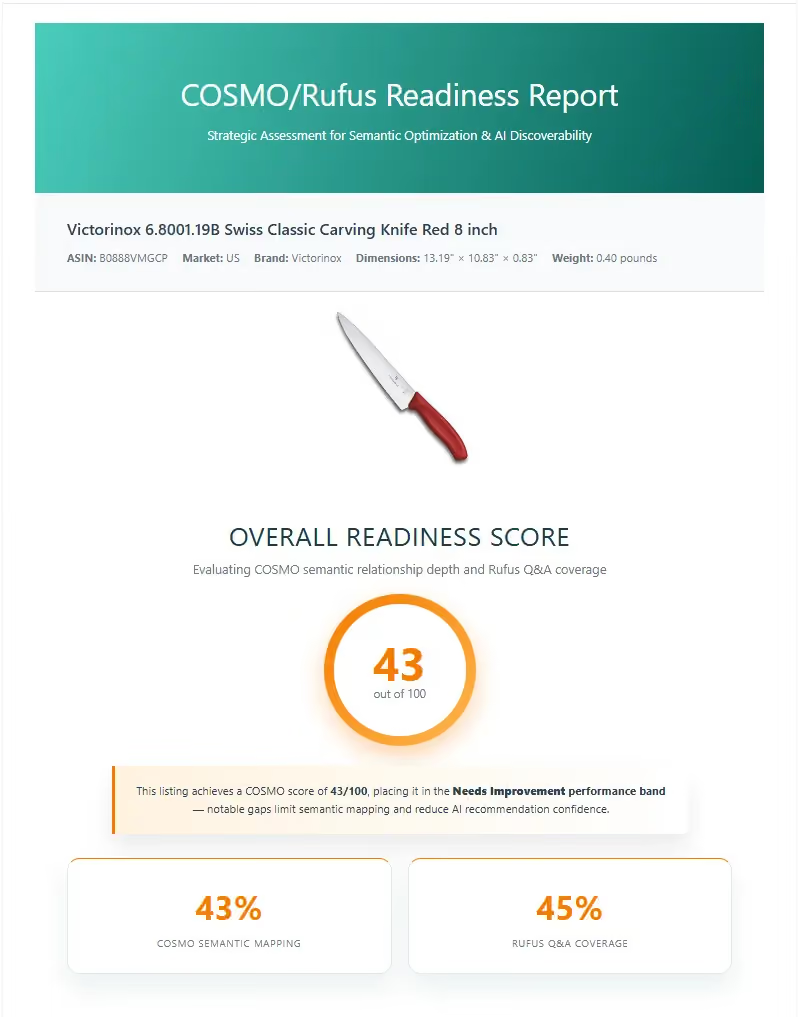
If your Q&A number sits well below your Semantic number, you've found the layer your other 21 free tools weren't built to measure. Across 5,000+ runs, for most listings, that's exactly where the gap shows up.
See where your listing stands - free, in under two minutes. Run the AI Readiness Score on any ASIN. We analyze your public listing data only. No payment, no credit card, no spam. Run Your AI Readiness Score →
Amazon's own free tools - the floor every seller starts from
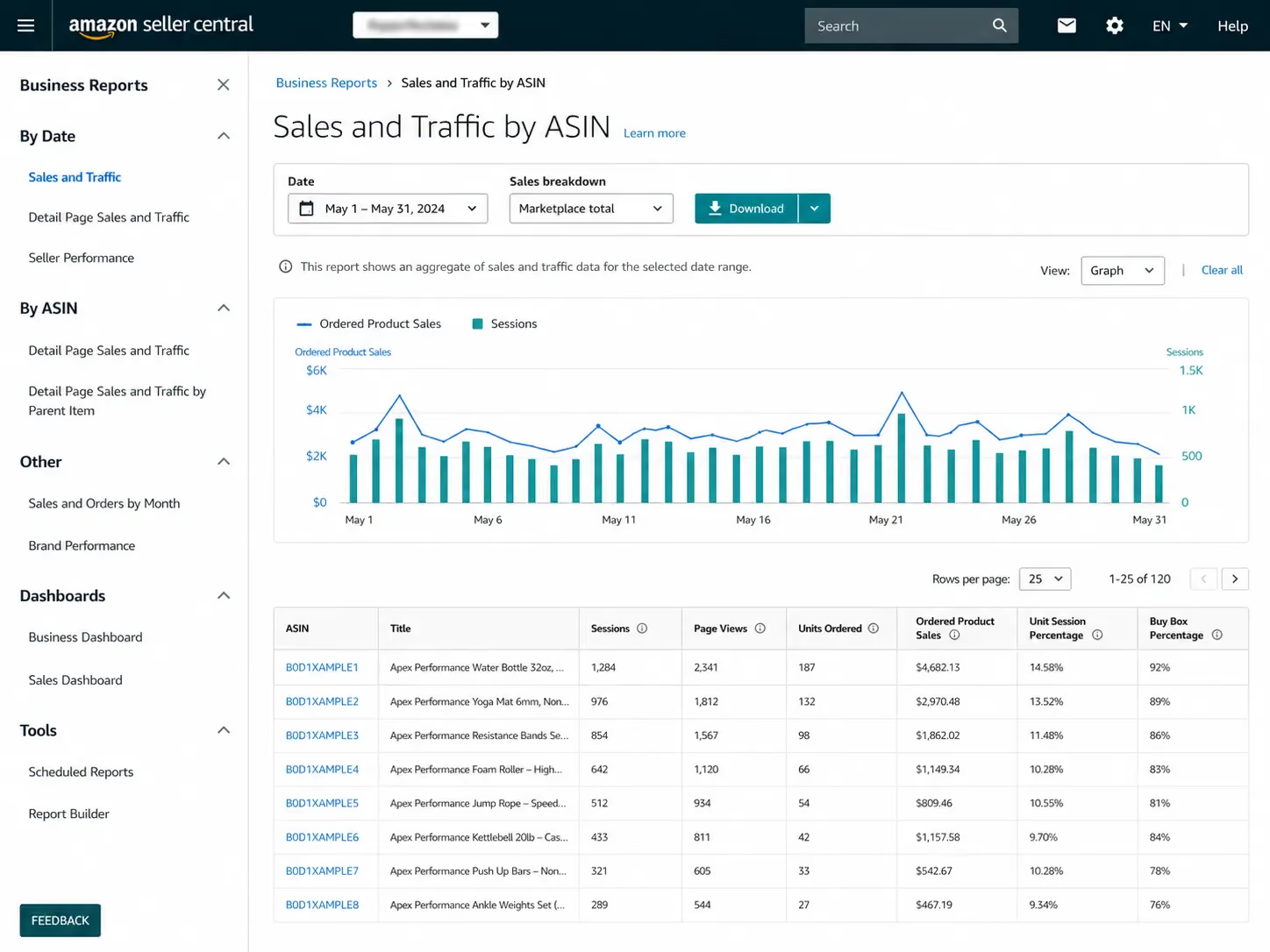
Across those 5,000+ AI Readiness Score runs, a pattern showed up that surprised us: when a seller said they'd "tried Amazon's own free tools," what they almost always meant was Seller Central, used for orders, inventory, and basic ads. Brand Analytics, sitting one tab away, mostly hadn't been opened, and the same was true of Manage Your Experiments and Growth Opportunities. The free Amazon-native toolkit turns out to be the most underused asset most sellers have.
Walk it first, before you pay for anything. Amazon doesn't give every tool away, and a few of them need Brand Registry, but the floor is wider than most sellers ever use.
Tool #2: Amazon Seller Central. The dashboard you already have if you sell. The pieces that earn their place beyond order management are Business Reports (sales by ASIN, by traffic source, by parent product), Inventory Health (stranded inventory, FBA fees, lost-sale risk), and the basic Sponsored Products console for entry-level paid ads. All free with your seller account.
Tool #3: Amazon Seller App. The mobile version of Seller Central, with push alerts on orders and Buy Box changes plus inventory updates from a phone. The app is the only one of these tools designed for the time-poor founder who's checking the business between meetings, on the road, or after the kids are asleep. Free.
Tool #4: Brand Analytics. Brand Registry required. You get search-term frequency rank (which queries shoppers used to find your category, and what they clicked), demographics (age and household income of buyers), and repeat-purchase behavior. The search-term data is the one Amazon-native dataset competitors don't have, since it comes from Amazon's own first-party search data. If you have Brand Registry and you haven't opened Brand Analytics this quarter, open it after you finish reading this.
Tool #5: Listing Quality Dashboard. Amazon's own listing-completeness score, which sits inside Seller Central. Worth knowing what it does and what it doesn't: it scores your listing against Amazon's content guidelines (title length, image count, A+ Content presence, attribute completion), but it does not measure COSMO Semantic Mapping or Rufus Q&A Coverage. The two scores look similar from the outside while measuring different things.
Tool #6: Product Opportunity Explorer. Amazon's own niche and keyword data tool, drawing on demand patterns pulled from Amazon's own search and click data. Strong for new-product validation, because you can see whether a niche has rising or falling demand and whether it's dominated by one or two big brands or shared across many small ones. Free, and open to most pro sellers.
Tool #7: Manage Your Experiments. Brand Registry required. Built-in A/B testing for titles, main images, A+ Content, and bullets - the closest thing to clean test results you'll get from anything Amazon-native. You split-test a change against your current listing for two to ten weeks, and Amazon reports the winner, which makes it the only honest way to prove a listing change moved a number on the keyword and A9 layer.
Tool #8: Growth Opportunities. A daily-refreshed list of picks Amazon thinks will move your sales, where each pick comes with a sales-impact estimate and a one-click action. Most sellers ignore it, and the picks aren't always right, but they're always specific - which makes them useful as a daily prompt even when you don't act on them.
Tool #9: FBA Revenue Calculator. Margin and profit sanity check. Paste an ASIN and you'll see Amazon's fee breakdown, your fulfillment cost, and projected net margin. Pre-launch table stakes - use it before you commit to FBA on a new product.
A note on Brand Registry. Tools #4 and #7 require it, and getting Brand Registry takes a registered trademark plus roughly two to four weeks of paperwork. The two tools it unlocks (Brand Analytics and Manage Your Experiments) happen to be the most data-rich free Amazon tools you'll find, which makes the path worth walking if you're a brand owner planning to scale.
That's eight Amazon-native tools - more than any third-party stack will surface in your first month. Three more shipped in 2026.
Amazon's 2026 native AI tools
Most free-tools listicles on the current SERP were written before Amazon shipped its 2026 native AI tools, and the three below didn't exist in 2024. Some of them launched only two months ago. They earn their place on this list because they're free, they're first-party, and they reframe what Amazon-native tooling looks like in 2026.
Tool #10: Brand Name Generator. Lives in the Build Your Brand section of Seller Central. You input a company description, product categories, target audience, and a few descriptive words (casual, elegant, playful), and the tool returns brand-name picks with notes on why each one works, plus a quick check against US Patent and Trademark Office records. Free, with no Brand Registry required, and useful before you file a trademark for a new product line.
Tool #11: Dynamic Canvas. Launched March 2026, free and open to sellers in the US and UK at launch. Dynamic Canvas is a visual workspace that answers plain-language questions: ask "how are my products doing this quarter" and it builds charts on sales trends, traffic, and inventory health, or ask "what if demand drops 10%" and it projects revenue and cash flow under that case. The system runs on Amazon Bedrock with Anthropic's Claude and Amazon's Nova models under the hood. Performance analysis is the launch feature, and Amazon plans to add marketing, inventory planning, and product launch features over the coming months.
The "what-if" feature is the part most sellers will actually use, because running a forecast against an inventory drawdown or a planned ad-spend cut in plain English (without exporting to a spreadsheet) is genuinely new for free Amazon tooling.
Tool #12: Enhance My Listing. Native AI listing-improvement features built directly into Seller Central, shipped in late 2025 and early 2026. The tool reads your existing product detail page and suggests edits to titles, attributes, descriptions, and missing details, drawing on what's working in your category and the seasonal patterns Amazon already sees. You accept, reject, or change each suggestion before it goes live, and the feature lives inside Add Products and the A+ Content Manager.
A useful distinction here: Enhance My Listing writes copy from a prompt and fills in the gaps a listing has against Amazon's content rules, but it does not build the structure that COSMO reads or write the answers Rufus needs. Writing is what these AI tools do, while engineering - the discipline known as Generative Engine Optimization for Amazon - is the layer the AI Readiness Score actually measures.
The Enhance feature is useful at the keyword and content layer, and it's needed, but it's not enough on its own if you're playing for AI-era discovery.
That's three more Amazon-native picks. Combined with the eight from the prior section, you have eleven free tools from Amazon itself before you install a single third-party extension, and most sellers don't realize the floor is that wide.
Where Amazon's own tools end is where third-party tools start earning their place.
Free research and intelligence tools - third-party picks
The third-party stack starts where Amazon's stops, because Amazon doesn't show you competitor sales estimates, doesn't surface market-wide search-trend velocity, and doesn't reverse-engineer the keyword set behind a competing ASIN. Third-party free tools fill that gap, and the five below have the strongest free offerings in the category.
A note on the experience of reading this section: across our seller conversations, tool fatigue is real. "Helium 10 is going downhill" shows up in seller forums every month. ChatGPT-driven listings produced fluent copy without any clear sales lift, and sellers who paid for AI features now have nothing clean to point to that says the features moved a number. The reader of a free-tools listicle in 2026 isn't naive - they've tried tools, been burned, and they're back at the free tier looking for what actually works. The list below names what does.
Tool #13: Helium 10 Free Plan + Chrome Extension. The strongest free offering in the third-party category, with caveats on the limits. The free plan gives you metered access to the paid platform: Black Box at 20 product searches per month, Cerebro at 2 uses per day with up to 20 keywords each, and Magnet at 50 keyword picks per month. Limited, but enough to test a niche idea or pull a competitor's ranking keyword set before you decide whether to pay. The Chrome Extension is where the free plan really earns its place, with Xray (live demand and revenue data on Amazon search results), Demand Analyzer, Sales Estimator, Profitability Calculator, Supplier Finder, and ASIN Grabber all bundled in. Drop it on a Chrome browser, log into a free Helium 10 account, and you're running the most capable free Amazon research extension on the SERP. Check the current free-tier limits at signup, because Helium 10 changes them from time to time.
Tool #14: Helium 10 Stand-Alone Free Tools. Separate from the freemium plan, Helium 10 publishes a set of free stand-alone web tools at https://www.helium10.com/tools/free/ , including the PPC Audit (audits your Sponsored Products account against benchmarks), an FBA Calculator (similar to Amazon's own, with extra fields), an Anomaly Tracker (flags abnormal changes in listings), a URL Builder (generates trackable Amazon URLs and 2-step links, which Helium 10 calls GEMS), a Sales Estimator, and a Trending Products tool. None of them require a Helium 10 account. We're naming them as a separate pick because the depth of free Helium 10 surface area is real, and most listicles don't surface them as separate tools.
Tool #15: SmartScout Free Tools. SmartScout's Chrome Extension is free with 1,000 uses per month. The headline feature is the Search Trends Explorer, which gives you past search-volume data on Amazon keywords with a story-of-the-trend view. The Snapshot feature sits on Amazon search results and shows competing FBA seller count, BSR, 30-day sales margin, and listing issues at a glance, while the Opportunity Score helps you decide whether a niche sits on the demand-curve side or the competition-curve side. The extension is in beta, so trust the directional read more than the exact numbers, especially on volume estimates.
Tool #16: Jungle Scout Free Sales Estimator. Web-based, with no signup required. Paste a competitor BSR and a category, and you'll get a monthly sales-volume estimate. The free tier limits you to 10 estimates per day and 300 per month, and it covers 10 marketplaces (US, UK, ES, MX, IT, IN, DE, FR, CA, JP). The sales-estimate model is Jungle Scout's most-used free utility, and it has become the standard reference for competitor monthly-sales estimates across the SERP.
Tool #17: AMZScout Free Sales Estimator and Free Tools. An alternative free Sales Estimator from AMZScout, with the same input pattern as Jungle Scout's. AMZScout also publishes a free FBA Calculator, Quick View (overlays sales data on Amazon search results), Stock Stats (estimated inventory data on a competitor ASIN), and a Super URL Tool. The free tier is narrower than the paid PRO Extension's bundle, but it's useful when you've burned through your Jungle Scout day-quota and need a second opinion.
A clean cross-cut to make: Helium 10's free plan is freemium, which means you're getting metered access to a paid product with the natural pull toward upgrade. SmartScout's Chrome Extension sits closer to genuinely free at 1,000 uses per month. Jungle Scout's and AMZScout's Sales Estimators are pure free utilities with no upgrade pull. They're different shapes; pick by what you need to do, not by which brand you've heard of.
Free price-tracking tools
Price history is the lookback layer. Real-time data tells you what's happening now, while price-history tools tell you what already happened - seasonality, buy-box volatility, competitor price moves, and holiday discount cycles. The two tools below are the standards in the category, and they overlap in purpose while differing in shape.
Tool #18: Keepa. Free Chrome extension, plus Firefox, Edge, Safari, and Opera versions. Keepa overlays an interactive price-history chart directly on the Amazon product page, and the chart covers Amazon retail price, FBA-seller pricing, used and warehouse-deal pricing, and Best Sellers Rank over time, all updated hourly. The free tier's chart view is the deepest free price-history surface available anywhere, and Keepa tracks roughly 5.6 billion products across 11 Amazon marketplaces (US, UK, DE, FR, IT, ES, JP, CA, IN, MX, AU). What you don't get for free is bulk-data export, the Product Finder, and advanced price-tracker alerts, which all sit behind a paid tier. The base chart, on every product page, is free, and no account is required.
Tool #19: CamelCamelCamel. A free price tracker, web-based with a browser extension called The Camelizer (Chrome, Firefox, Edge, Opera, Safari). The alert system is cleaner than Keepa's: set a target price for any Amazon ASIN and you'll get an email when the listing hits it. CamelCamelCamel tracks 8 Amazon marketplaces (US, CA, UK, DE, FR, IT, ES, JP), with Australia mentioned in some sources. The price-history charts are shallower than Keepa's, but the alerts are easier to use, and the site stays free by running ads and Amazon affiliate links on tracked products.
You can pick one or use both. Keepa wins on chart depth and seller-side price research, which is useful when you're studying a competitor's pricing pattern, modeling holiday discount cycles, or watching for a category trending down. CamelCamelCamel wins on consumer-side price alerts, which is useful when you're shopping a wholesale supplier, watching a parts cost, or tracking an arbitrage source. Most sellers we work with run Keepa for research and CamelCamelCamel for alerts, because the two jobs don't overlap as much as they look like they do.
These are A9-era tools at heart. They tell you what prices did, but they don't tell you whether your listing is readable to COSMO or to Rufus, because that layer doesn't show up on a price chart.
Free off-Amazon tools
Amazon-only research has a blind spot: it sees demand inside the marketplace, but it misses the broader search context that drives shoppers to Amazon in the first place. Two free off-Amazon tools cover that gap.
Tool #20: Google Trends. Public, free, and no account required. Surfaces relative search-volume curves over time, with geographic spread, related queries, and seasonality patterns. The use cases that earn their place for an Amazon seller are confirming a category trend before you source inventory, checking seasonality assumptions on a planned product launch, comparing two brand names to see which has rising versus falling search interest, and spotting demand turning points (the moment a niche starts climbing or starts dying). Google Trends doesn't show absolute search volume, only relative, but the curve shapes are usually what matters when you're deciding whether to commit to a category.
Tool #21: Google Keyword Planner. Free with a Google Ads account (the account itself is free; you don't have to run ads to access the planner). It pulls broader keyword search volumes than Amazon's own keyword tools surface, with the honest caveat that these are Google search volumes rather than Amazon search volumes. They're useful as directional signal - if a keyword has 50K monthly Google searches and your category targets buyers who research before they buy, that's a real demand pool - but you can't read them as Amazon-specific demand the way you'd read volumes from an Amazon-native keyword tool.
Two tools, both underused in competitor listicles because the cut isn't obviously Amazon-shaped. They earn their place because shoppers don't live inside Amazon's marketplace; they live in the rest of the internet first.
Free shipping and operations
One free tool covers shipping for sellers operating beyond Amazon-only.
Tool #22: Veeqo. Amazon-owned multi-channel shipping software, acquired by Amazon in 2021 and offered free to sellers. Veeqo plugs into Amazon, Shopify, eBay, Etsy, and Walmart - the four other channels most multi-channel sellers run alongside Amazon - and lets you print shipping labels at pre-negotiated rates from UPS, USPS, FedEx, and DHL. The credit feature is where it earns a place on a 2026 list: you earn up to 5% back in Veeqo Credits on eligible shipments, with 5% back on every shipment for the first two months and a tiered amount after that. Credits then deduct from your next bill.
Best fit for sellers running FBM (Fulfilled by Merchant) on some of their inventory or operating across multiple channels. If you're FBA-only, you don't need this layer, because Amazon handles fulfillment and shipping for you and Veeqo's discount doesn't apply. If you ship from your own warehouse on any of your SKUs, Veeqo replaces ShipStation or ShippingEasy as your label-printing tool, with the credit-back as the financial argument. Free to install, free to use, with the carriers paying Veeqo a small commission per label.
Where free becomes a blind spot
Twenty-two free tools - eleven from Amazon itself, ten from third parties, and one diagnostic. Each one earns its place in the AI-era seller stack, and none of them are pitches dressed as picks.
Walk what they cover. Amazon Seller Central, the Seller App, Brand Analytics, the Listing Quality Dashboard, Product Opportunity Explorer, Manage Your Experiments, Growth Opportunities, the FBA Revenue Calculator. Brand Name Generator, Dynamic Canvas, Enhance My Listing. Helium 10's free plan and stand-alone tools, SmartScout, Jungle Scout, AMZScout. Keepa and CamelCamelCamel. Google Trends, Google Keyword Planner. Veeqo. Twenty-two tools spread across discovery, research, content, A/B testing, pricing, fulfillment, and operations.
Now name what none of them does.
None of them tells you whether your listing is readable to COSMO, and none of them tells you whether Rufus can answer a buyer's question from your listing copy. The dashboards stay clean, the keyword work looks done, and the score still comes back at 65 with the gap on the Q&A side.
We saw that exact shape across more than 5,000 AI Readiness Score runs. Sellers expected Strong because their Helium 10 dashboard looked clean, and they got Adequate, with the binding constraint sitting on the layer the dashboards weren't measuring. The 70 next to the 54 was the same shape every time.
The diagnostic category is forming, even if the SERP hasn't caught up yet. On April 30, 2026, Apify shipped a clone of the AI Readiness Score that runs API-only with a free tier and pay-per-call pricing after, while Cosmy gates its scoring behind a 15-minute demo booking. The legacy A9-era platforms have nothing in this category at all. Eighteen months ago this category didn't exist; today the 300 million shoppers using Rufus already do.
The action sits in two minutes. Pull your top three ASINs - your highest revenue, your most-trafficked, and your newest - and run each one through the AI Readiness Score. Look at the split. The Semantic number tells you whether COSMO can place your product in its graph, and the Q&A number tells you whether Rufus can answer a buyer's question from your listing.
Free is enough for the layer free tools were built to measure. But free without a diagnostic is optimization without a baseline, and across all 22 of these tools, every one of them earned its place - yet none of them moved the 54.
See where your listing stands - free, in under two minutes. Run the AI Readiness Score on any ASIN. We analyze your public listing data only. No payment, no credit card, no spam. Run Your AI Readiness Score →
Free Amazon seller tools: questions sellers actually ask
Are free Amazon seller tools enough to start a brand on Amazon?
For an early-stage seller validating a first product, yes - Amazon Seller Central, the FBA Revenue Calculator, Helium 10's Chrome Extension free tier, and Google Trends will get you through niche selection, sourcing, and your first listing. The line gets crossed when you can no longer measure whether your changes are working. Once you're optimizing live listings against AI-era discovery, you need a diagnostic, and the free AI Readiness Score is the entry point.
What's the difference between Helium 10 free and Keepa free?
Helium 10's free plan is freemium - you're getting metered access to a paid platform, with monthly limits on Black Box, Cerebro, and Magnet, and the pull toward upgrade is intentional. Keepa's free tier is genuinely free for the chart view: every Amazon product page gets the price-history overlay with no account required and no limit. They're different products with different shapes - Helium 10's free is a sample of a broader paid product, while Keepa's free is the chart, full stop.
Is the AI Readiness Score really free?
Yes - it's free and ASIN-only. Paste in a product link and the tool runs without payment, credit card, or demo gate. Apify shipped a separate API clone that runs pay-per-call after a free tier, but the AI Readiness Score itself is free on the web. The output is a 0-to-100 score with COSMO Semantic Mapping and Rufus Q&A Coverage broken out, plus the specific gaps the tool found in your listing copy.
When should I upgrade from free tools to paid tools?
The decision is data-driven, not budget-driven. Run the AI Readiness Score and look at your sub-scores. If your Semantic number is in the 70s while your Q&A number is in the 50s - the typical shape across more than 5,000 runs - you're optimizing the wrong layer. The upgrade question becomes which paid tool addresses the layer your score says you're missing, and most of them don't. The decision sits downstream of the score, not above it.